

Third Party Risk Management
Definition
Section titled “Definition”Third Party Risk Management (TPRM) shows the digital risk that your suppliers, service providers, and partners bring to your organisation. StyxView combines two kinds of evidence for each third party:
- External monitoring. StyxView scans the third party's internet-facing assets and gives it a Digital Risk Score from 0 to 1000, where a higher score means more risk.
- Security questionnaires. The third party answers questionnaires that you send, and the answers can be scored on the same 0 to 1000 scale.
You then record the risks you decide to act on in the Risk Register and track each one to resolution.
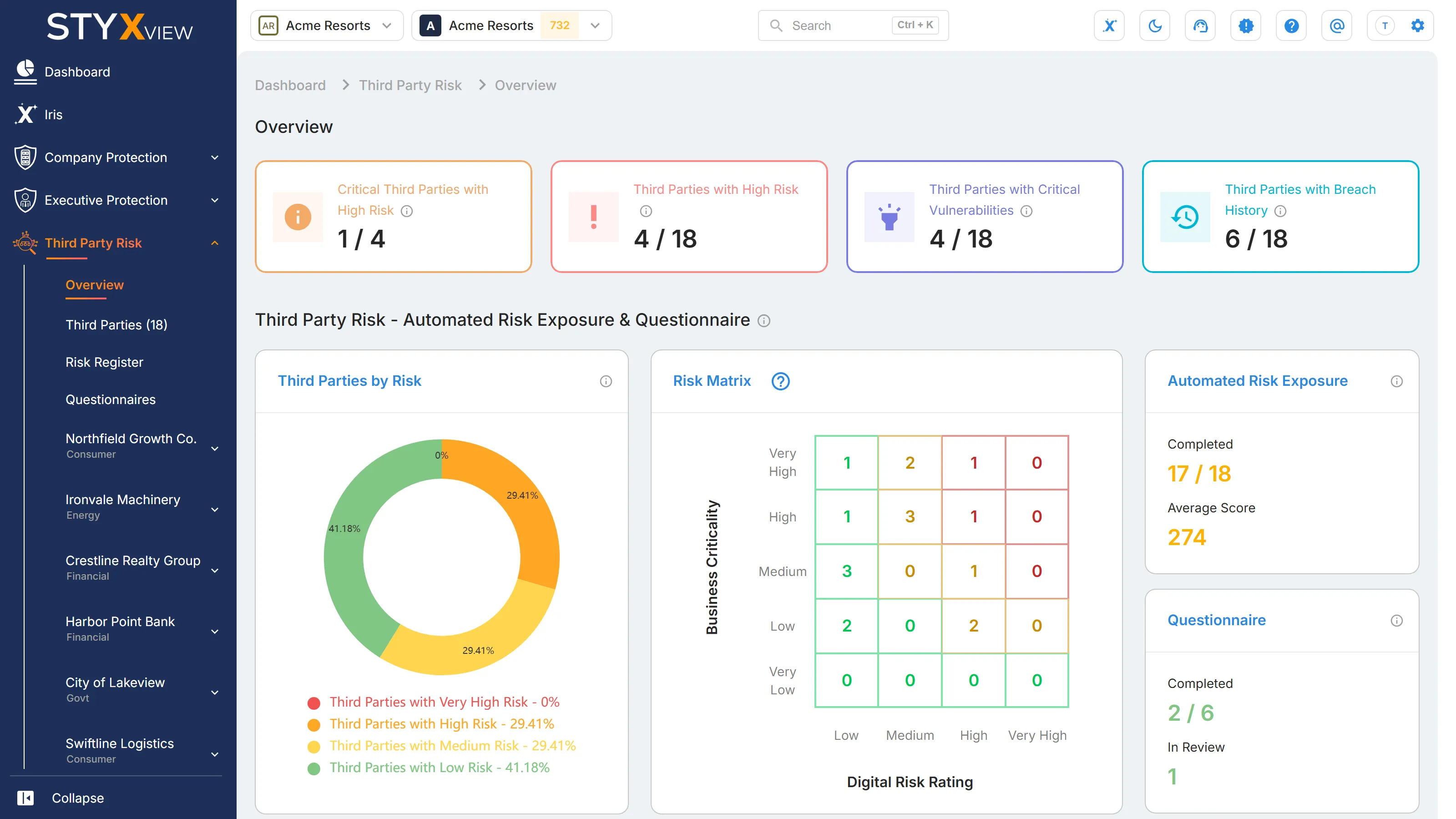
Third Party Risk appears in the sidebar when your account includes it. Under "Third Party Risk" you find "Overview", "Third Parties", "Risk Register", "Questionnaires", and one entry for each third party you monitor. Admin users also see "TPRM Questionnaire Library" in the sidebar.
Use cases
Section titled “Use cases”| Use case | What StyxView does | Where to read more |
|---|---|---|
| Score each third party's external exposure | Calculates a Digital Risk Score for each third party from its exposed services, vulnerabilities, misconfigurations, and data leakage. The score is recalculated every day. | Individual Third Party Dashboard, Third Party Risk Indicator List |
| Decide where to look first | Plots your third parties on a Risk Matrix of "Business Criticality" against "Digital Risk Rating", and counts the business-critical third parties with high risk. | Third Party Overview Dashboard |
| See breaches and dark web exposure | Shows each third party's breach disclosures, breach history, and dark web mentions under its "Data Leakage & Dark Web Detection" pages. | Individual Third Party Dashboard |
| See lookalike domains | Counts domains that imitate the third party's domains, a common sign of phishing or impersonation. | Individual Third Party Dashboard |
| Collect security questionnaires | Sends questionnaires from system templates or your own, once or on a recurring schedule, and tracks each one until it is complete. | Sending Out a Questionnaire |
| Review and approve answers | Lets your reviewers comment on each answer, request changes from the third party, or accept the questionnaire as complete. | Managing Questionnaire Responses and Feedback |
| Score questionnaire answers | Weights the questions in a template and converts each answer into credit, giving a questionnaire risk score from 0 to 1000. | Addition of Third Party Questionnaire |
| Combine both kinds of evidence | Shows a Combined Risk Score that averages the Digital Risk Score and the latest completed questionnaire score. | Combined Risk Score |
| Track risks to resolution | Records each risk with an owner, a rating, a treatment, and a target date, and supports a formal acceptance step. | Risk Register |
| Track each third party's lifecycle | Records where each third party stands, from "Identified" through "Active / Onboarded" to "Offboarded / Decommissioned", along with its business criticality. | Third Party Overview Dashboard |
| Report to stakeholders | Generates third-party reports once or on a weekly or monthly schedule. | Creating Third Party Risk Reports |
To start monitoring an organisation, see Add Third Party.