

DNS Health Issues
Overview
Section titled “Overview”The "DNS Health Issues" page lists problems found in your domains' DNS records, most of them in the email authentication records (SPF, DKIM, and DMARC) that stop others from sending mail as you. Each row is one issue on one domain.
Open it from "Company Protection" > "Attack Surface Management" > "DNS Health Issues".
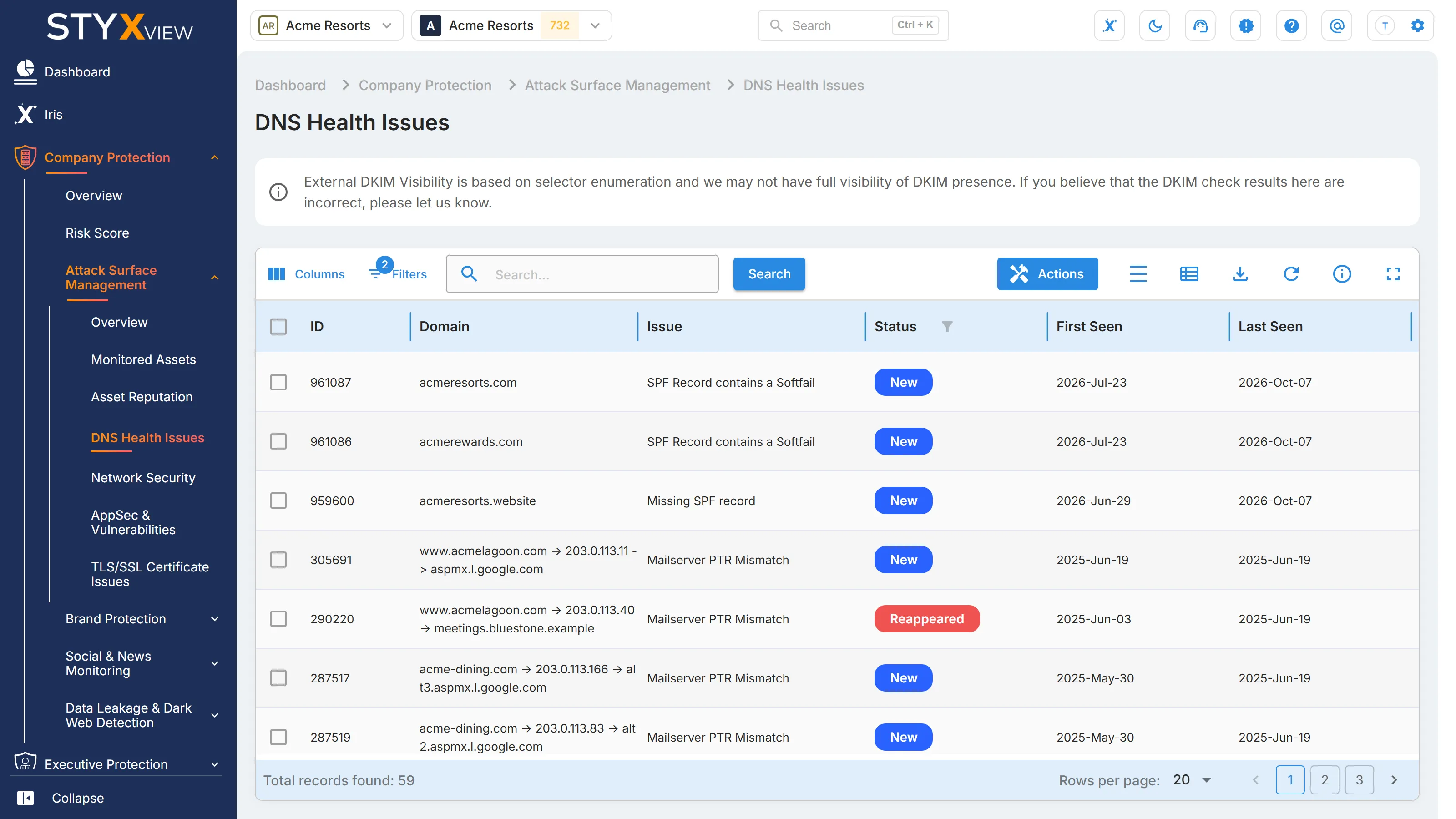
Columns
Section titled “Columns”| Column | What it shows |
|---|---|
| ID | The finding's permanent identifier. |
| Domain | The domain the issue was found on. For a mail server reverse DNS mismatch, it shows the domain, the mail server's IP address, and the mail server. |
| Issue | The problem found. See the table below. |
| Status | Where the finding is in the triage workflow. See Findings for each status. |
| First Seen | When StyxView first found the issue. |
| Last Seen | The most recent check that still found it. |
| Severity Rating | How serious the issue is, from "Very Low" to "Very High". |
| Associated Risks | What the issue can lead to. |
| Assigned User | The user the finding is assigned to. |
| Latest Comment | The most recent comment on the finding. |
"Issue Description" and "Issue Recommendation" are hidden by default. Add them with "Columns" to read what each issue means and how to fix it.
Issues
Section titled “Issues”| Issue | What it means | Default rating | Associated risks |
|---|---|---|---|
| Missing SPF record | The domain publishes no SPF record, so receivers cannot tell which servers may send its mail. | "Very High" | "Easier Spoofing", "Business Email Compromise", "Impersonation" |
| Multiple SPF records | More than one SPF record is published, which breaks SPF validation. | "Very High" | "Easier Spoofing", "Business Email Compromise", "Impersonation" |
| Lack of qualifier - SPF record | The SPF record does not say how to treat mail from unlisted servers. | "High" | "Easier Spoofing", "Business Email Compromise", "Impersonation" |
| SPF Record Contains Wildcard | A mechanism in the SPF record uses a wildcard, which SPF does not support, so it authorises no sender. | "High" | "Email Deliverability Issues" |
| SPF Record contains a Softfail | The SPF record ends in "~all", which marks unlisted senders as suspicious but does not reject them. | "Medium" | "Easier Spoofing", "Business Email Compromise", "Impersonation" |
| Missing DMARC record | The domain publishes no DMARC policy. | "Very High" | "Lack of Reporting/Visibility" |
| Multiple DMARC records | More than one DMARC record is published for the domain. | "Very High" | "Email Deliverability Issues" |
| Missing DKIM record | No DKIM public key was found for the domain. | "Very High" | "Easier Spoofing" |
| Missing backup email server | Only one mail server is configured, a single point of failure for mail delivery. | "Medium" | "Service Downtime" |
| Missing backup name server | Only one name server is configured, a single point of failure for the domain. | "Medium" | "Service Downtime" |
| Mailserver PTR Mismatch | The reverse DNS record of a mail server's address does not match the name the server announces. | "Low" | "Reduced Email Deliverability", "Increased Spam Classification" |
See SPF Records, DKIM Records, DMARC Records, and Domain Hygiene for each domain's records.
Working with findings
Section titled “Working with findings”By default the grid shows open findings, with the status "New", "Analyzing", "On Watchlist", "Response In Progress", or "Reappeared", and hides findings marked as false positives. Change "Filters" to see the rest.
To act on findings:
- Select the checkbox of one or more rows, then select "Actions". To act on one row, you can right-click it instead.
- Choose an action:
- "Update Status" moves the findings through the triage workflow.
- "Assign To" assigns them to a user.
- "Comment" adds a note.
- "Mark as False Positive" records that a finding is not a real issue. "Unmark as False Positive" reverses it.
- "Accept Risk" records a decision to leave the issue unfixed: the finding's status becomes "Closed Without Action", so it leaves the open list, and it keeps being detected. "Undo Accept Risk" sets it to "Reappeared" and adds it to the watchlist. See Accept Risk.
- Enter the context the dialog asks for, then select "Confirm".
Select a row to open the finding's detail page. See Findings.
Start with the "Very High" email authentication issues: they decide how easily someone can send mail as you.
Third parties
Section titled “Third parties”For a third party you monitor, open "Third Party Risk", the third party's name, "Risks", then "DNS Health Issues". The grid lists that third party's issues, and "Actions" offers "Create Risk", which raises a risk from the selected findings in the Risk Register.