
Social & News Monitoring Overview
Social & News Monitoring overview
Section titled “Social & News Monitoring overview”The overview shows what is being said about your organisation on social media and in the news: what to review first, how it reads, where it comes from, and the latest posts and articles themselves.
To open it, select "Company Protection" in the left menu, then "Social & News Monitoring", then "Overview".
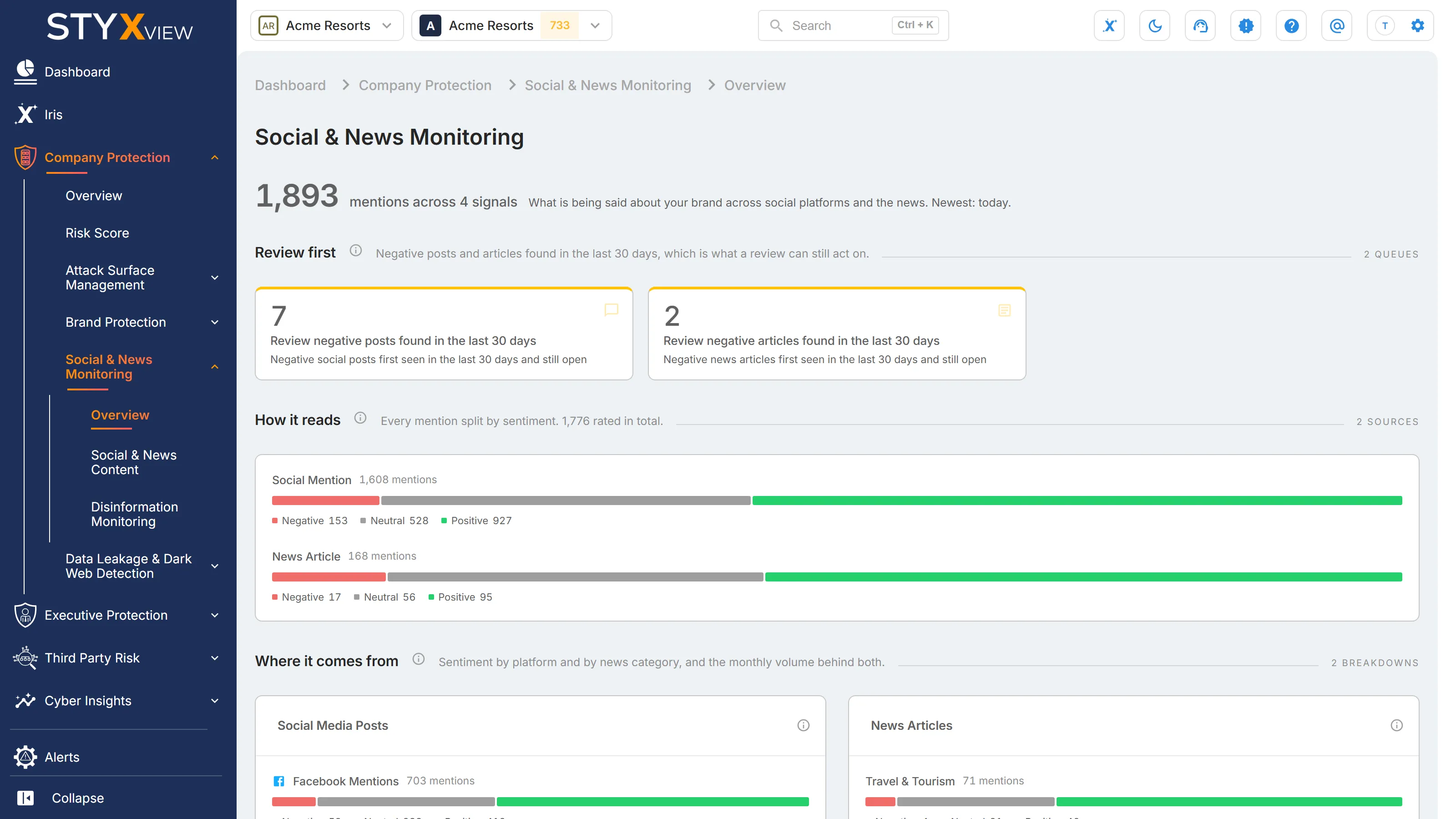
At the top, a large number counts your mentions, followed by "mentions across" and the number of signals that hold any. It adds up the "Open" column of All signals: every post and article collected, plus the open negative sentiment findings raised from them. The line beside it says how long ago the newest post or article arrived. If collection is running but nothing new has arrived for more than 30 days, it adds "Collection is active but nothing new has arrived." The headline does not open a list.
The figures are calculated once a day, so a change you make in a list can take up to a day to show here.
Each section heading has an info icon. Hover over it to see what the section counts and how to read it.
When Disinformation Monitoring is enabled for your account, "Disinformation Monitoring" also appears under "Social & News Monitoring" in the sidebar. See Disinformation Monitoring.
Review first
Section titled “Review first”Two queues of negative content found in the last 30 days, which is what a review can still act on:
- "Review negative posts found in the last 30 days" counts open negative sentiment findings on social media posts first seen in the last 30 days.
- "Review negative articles found in the last 30 days" counts the same for news articles.
The queues go by how recent a finding is rather than by severity, because every negative post and article carries the same "Medium" rating. Select a queue to open Findings filtered to that kind of finding, first seen in the last 30 days.
When both queues are 0, a line below them reads "Nothing new to review. No negative post or article has been found in the last 30 days." That is a real answer, not a page that failed to load. The counts do not go down as you review until the next daily update.

How it reads
Section titled “How it reads”Every mention split by sentiment, with one bar for "Social Mention" and one for "News Article". Each bar runs "Negative", "Neutral", and "Positive", and the legend below it gives each count. The note under the heading gives the total rated. Mentions with no sentiment recorded are left out, so each bar adds up.
- Select "Social Mention" or "News Article" to open the Tabular View of Social & News Content, filtered to posts or to articles.
- Select a part of a bar, or a sentiment in its legend, to open the same list filtered to that sentiment as well. Hover over a part to see its count out of the total.

Where it comes from
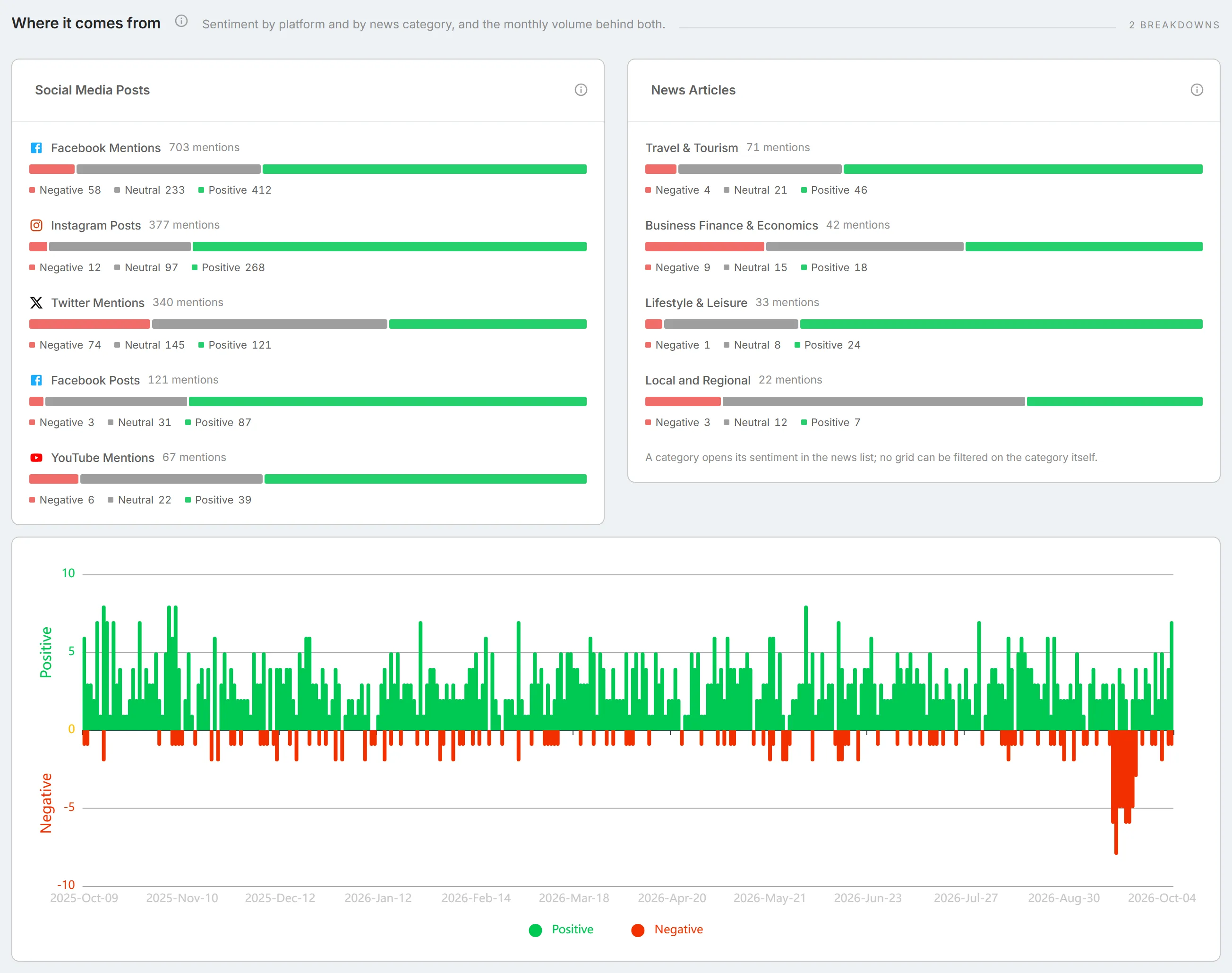
Section titled “Where it comes from”Sentiment by platform and by news category, and the daily volume of positive and negative mentions behind both. The section appears when there is something to show in it.
Social Media Posts
Section titled “Social Media Posts”One bar per platform, biggest first, each split into "Negative", "Neutral", and "Positive" posts, with the total beside the platform's name. Platforms are not directly comparable: each is collected through a different source with its own reach, so a longer bar means that platform returns more, not that more is being said there. Sentiment is assigned to each post automatically, so treat a single post's sentiment as an indication rather than a verdict.
Select a platform to open the Tabular View filtered to its posts, or a part of its bar to add that sentiment.
News Articles
Section titled “News Articles”One bar per news category, biggest first, split the same way. An article with no category is not counted here, and an article in several categories is counted in each, so these bars need not match the news count elsewhere on the page.
Select a part of a bar, or a sentiment in its legend, to open the Tabular View filtered to articles with that sentiment. Selecting a category opens all articles, because the list cannot be filtered by category. The card says so in its last line.
The daily chart
Section titled “The daily chart”Below the two cards, a chart of the last 12 months shows the number of "Positive" posts and articles per day above the centre line and "Negative" ones below it. Days with neither are left out. A sharp rise from a steady level is the signal to look for. Hover over a day to see its counts. The chart does not open a list.
What was said
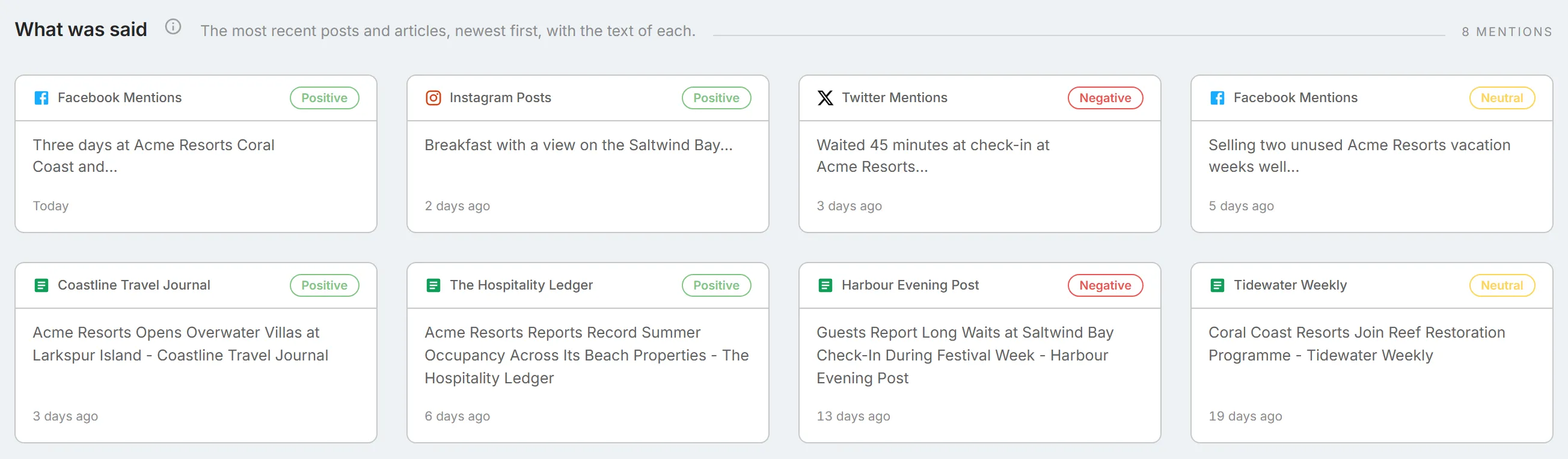
Section titled “What was said”The latest posts and articles themselves, up to eight cards: the four most recent social media posts, then the four most recent news articles, each newest first. The cards are chosen by date, not by sentiment or importance. This is the only place on the page that shows what was written rather than a count of it.
Each card shows:
- the platform, or the outlet for a news article;
- its sentiment tag: "Positive", "Neutral", or "Negative";
- the start of the post, or the article's headline;
- how long ago it was posted.
Select a card to open the post or article's detail page. See Detail pages.
All signals
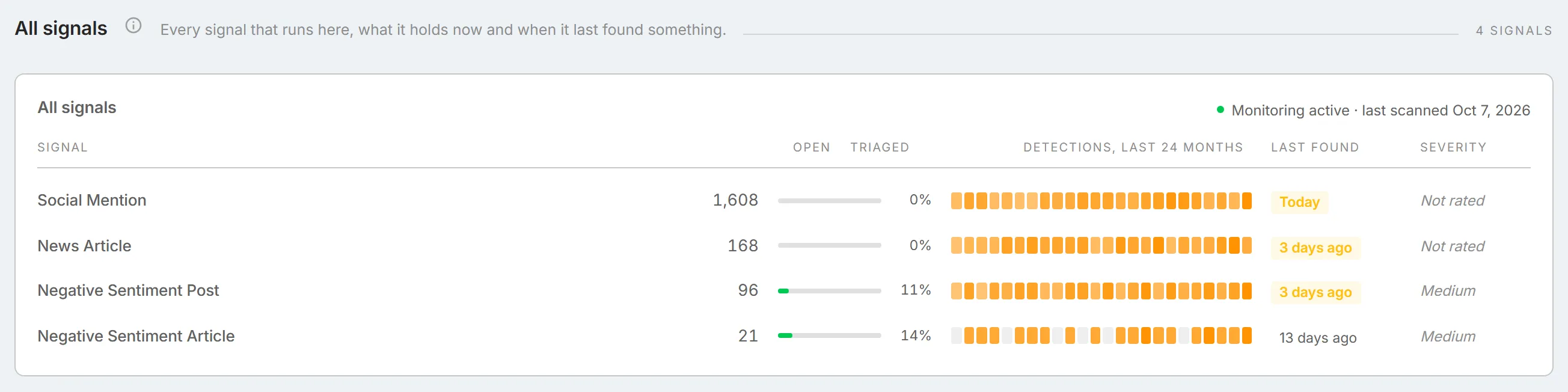
Section titled “All signals”Every Social & News Monitoring signal that has found something on your organisation, with the most open first. The card's title line reads "Monitoring active · last scanned" and the date of the last scan.
Two of the signals are the collected posts and articles themselves, and two are findings raised from them:
- "Social Mention" and "News Article" count every post and article collected that is not marked as a false positive. They carry no status, so "Triaged" is always 0%, and their severity reads "Not rated". Select either row to open the Tabular View filtered to posts or to articles.
- "Negative Sentiment Post" and "Negative Sentiment Article" count open findings, which you can review and triage. Their severity is always "Medium". Select either row to open Findings filtered to that kind of finding.
The two kinds are counted differently, so a mention count and a finding count from the same source do not match.
| Column | What it shows |
|---|---|
| "Signal" | The kind of mention or finding. |
| "Open" | The mentions collected, or the open findings. |
| "Triaged" | The share of the open findings that have moved past "New". |
| "Detections, last 24 months" | One cell per month, shaded by how many were found that month. Hover over a cell to see the month and its count. |
| "Last found" | How long ago the newest one was found, highlighted when it was within the last seven days. "None found" means nothing has been found. |
| "Severity" | "Medium" for the two findings, and "Not rated" for the two kinds of mention. |