

Risk Score
Overview
Section titled “Overview”What Is the Digital Risk Score?
Section titled “What Is the Digital Risk Score?”The Digital Risk Score rates an organization's external digital risk on a scale of 0 to 1000. Higher is worse: 0 is the lowest risk and 1000 the highest. Use it to see where your exposure stands, to track it over time, and to decide which remediation lowers it most.
StyxView calculates a score for your organization and for each third party you monitor, with the same method. It recalculates every score every four hours.
StyxView assigns each score to one of four risk bands. You cannot set the band yourself.
| Band | Digital Risk Score |
|---|---|
| Very High | 750 to 1000 |
| High | 400 to 749 |
| Medium | 200 to 399 |
| Low | 0 to 199 |
The Risk Score Page
Section titled “The Risk Score Page”To open the Risk Score page for your organization, select "Company Protection" and then "Risk Score" in the sidebar. For a third party, select "Third Party Risk", the third party, and then "Risk Score". You can also select the "Digital Risk Score" tile on the dashboard.
The page has four tabs:
| Tab | What it shows |
|---|---|
| "Overview" | The score, the categories and indicators driving it, and how it is calculated. Described below. |
| "Risk Score Card" | Every risk indicator, grouped by category, with its grade. See Risk Score Card. |
| "Risk Indicator List" | Every risk indicator with its findings, score contribution, and remediation status. See Risk Indicator List. |
| "Historic Risk Score" | How the score changed between two scoring runs, and why. Described below. |
Use "Select Date" to see the score on an earlier date. The first three tabs show the last scoring run of the day you select.
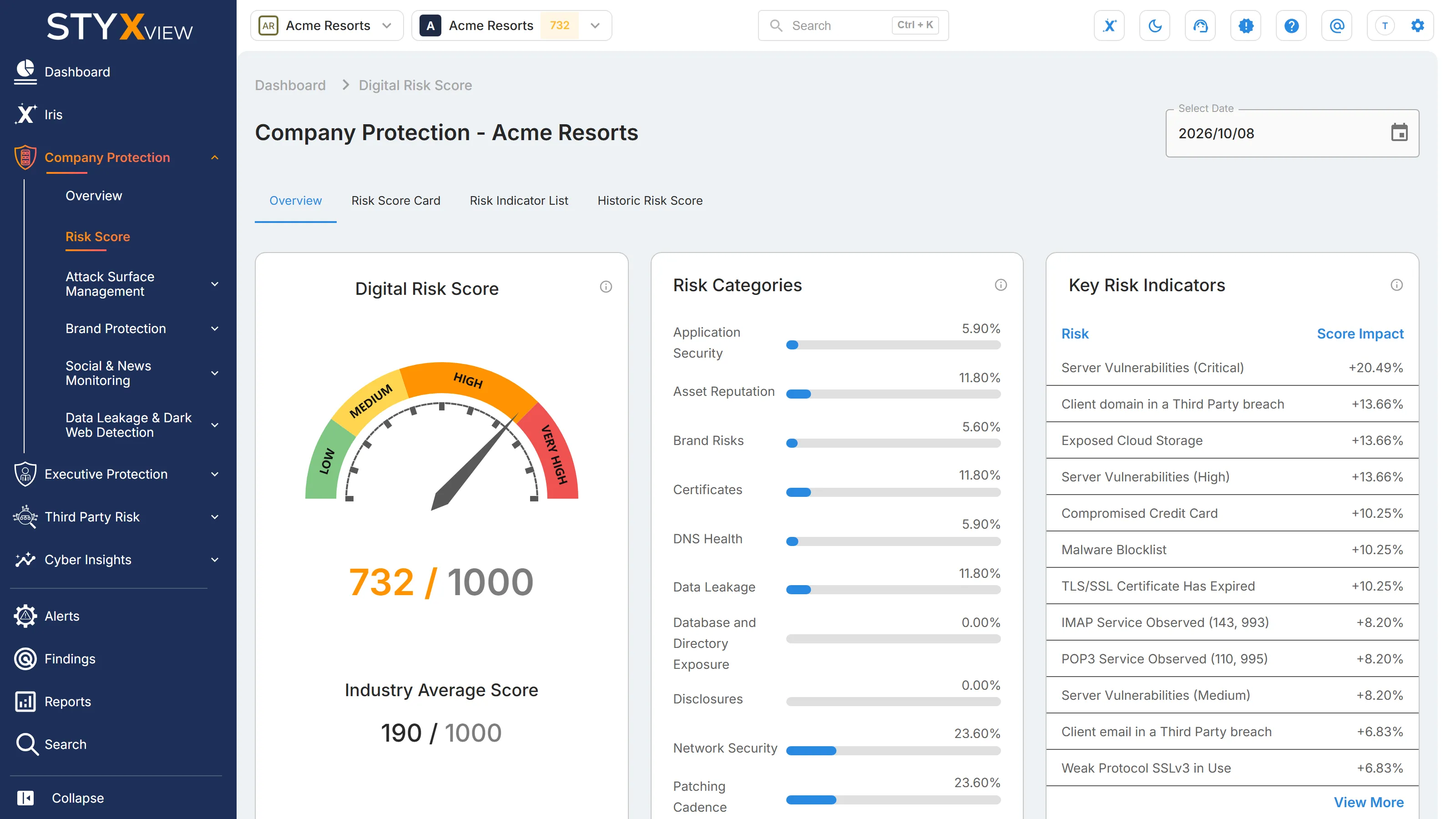
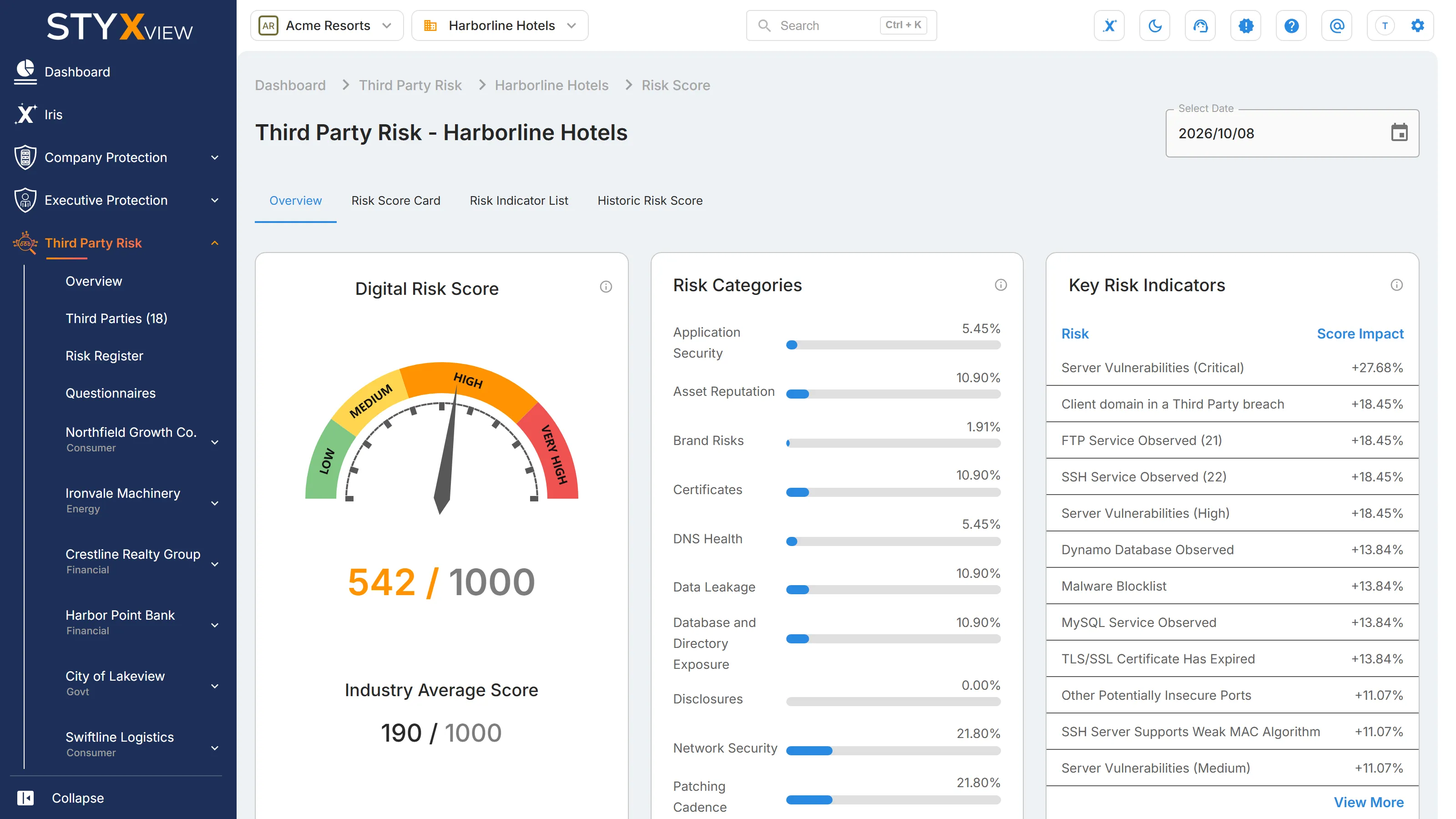
Overview Tab
Section titled “Overview Tab”| Card | What it shows |
|---|---|
| "Digital Risk Score" | The current score out of 1000, on a gauge coloured by band, and the "Industry Average Score": the average score of the organisations StyxView monitors in the same industry. |
| "Risk Categories" | Each category's share of the current score, as a percentage. Select a category to open the Risk Indicator List filtered to it. |
| "Key Risk Indicators" | The 12 indicators adding the most to the score. "Score Impact" is each indicator's points as a percentage of the score. Because each category is capped (see below), the percentages can add up to more than 100%. Select "View More" to open the Risk Indicator List. |
| "Findings" | Each dot is one risk indicator, placed by its severity (rows) and its grade (columns, from A to F). Hover over a dot to see the indicator's name, category, subcategory, and description. |
| "Indicator Category Weights" | The weight of each category. See Risk Score Categories and Weightages. |
| "Digital Risk Score Calculation" | The score range of each risk band. |
| "Indicator Grading" | The grade scale, from A (best) to F (worst). |
For how indicators, grades, and weights combine into the score, see The Calculation.
Risk Data Collection
Section titled “Risk Data Collection”The score is built from the findings of your Company Protection modules. Each module feeds one or more risk categories.
| Module | Risk categories it feeds |
|---|---|
| Attack Surface Management | Application Security, Asset Reputation, Certificates, Database and Directory Exposure, DNS Health, Network Security, and Patching Cadence |
| Brand Protection | Brand Risks: lookalike domains, social media impersonation, rogue mobile apps, unauthorised job postings, and similar threats to your brand |
| Social & News Monitoring | Brand Risks: negative news and social media sentiment |
| Data Leakage & Dark Web Detection | Data Leakage: breached accounts, compromised payment cards, dark web mentions, and exposed cloud storage and code |
The Brand Risks category also includes an Industry Risk indicator, which reflects the inherent cyber risk of your industry rather than your own findings.
Risk Score Categories and Weightages
Section titled “Risk Score Categories and Weightages”Every risk indicator belongs to one of ten categories. Each category has a fixed weight, which is the most it can add to the score: a category weighted 20% can add at most 200 of the 1000 points. Once a category reaches that cap, more findings in it do not raise the score. The weights are the same for every organisation and third party.
| Category | Weight | Maximum points | What it covers |
|---|---|---|---|
| Network Security | 20% | 200 | Remote access services (FTP, SSH, and RDP) and insecure services (Telnet, SMB, VNC, and other risky ports) reachable from the internet, weak SSH protocols and ciphers, and exposed internal IP addresses. |
| Patching Cadence | 20% | 200 | Known vulnerabilities on your servers, by severity: Critical, High, Medium, and Low. |
| Asset Reputation | 10% | 100 | Your IP addresses and domains listed on abuse, exploit, malware, phishing, or spam blocklists. |
| Certificates | 10% | 100 | TLS/SSL certificate problems, such as expired, revoked, self-signed, or mismatched certificates, and servers that accept weak protocols or ciphers. |
| Data Leakage | 10% | 100 | Your data exposed outside your control: email addresses and domains in breaches, compromised payment cards, dark web mentions, data breaches, and exposed cloud storage or code repositories. |
| Database and Directory Exposure | 10% | 100 | Databases (such as MySQL, MongoDB, and Elasticsearch) and LDAP directory services reachable from the internet. |
| Application Security | 5% | 50 | Missing or weak HTTP security headers on your websites, such as Strict Transport Security and Content Security Policy. |
| Brand Risks | 5% | 50 | Misuse of your brand, negative news and social media sentiment, and the inherent risk of your industry. |
| DNS Health | 5% | 50 | Email authentication and DNS resilience: missing SPF, DKIM, or DMARC records, PTR record problems, and domains without a backup mail server or name server. |
| Disclosures | 5% | 50 | No risk indicators are assigned to this category at present, so it adds 0 points. |
| Total | 100% | 1000 |
Risk Score Card
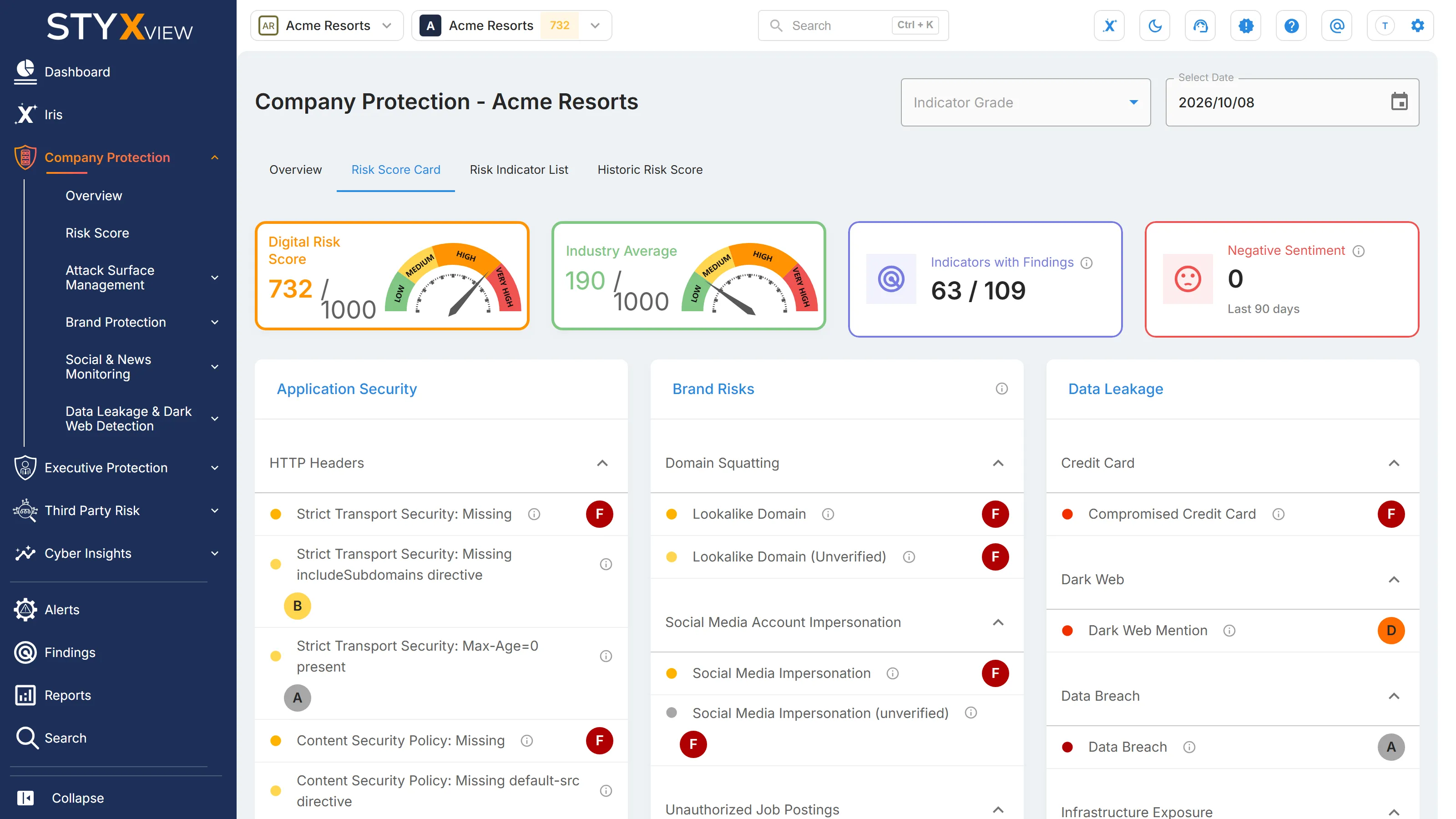
Section titled “Risk Score Card”The "Risk Score Card" tab of the Risk Score page shows every risk indicator in your Digital Risk Score, grouped by category and subcategory, with the grade each one has today. Use it to see which areas are graded worst and to open the findings behind an indicator. This page also explains how grades become the score.
What It Shows
Section titled “What It Shows”Four tiles at the top:
| Tile | What it shows |
|---|---|
| "Digital Risk Score" | The current score, out of 1000. |
| "Industry Average" | The average score of the organisations StyxView monitors in your industry. For a third party, this tile is "Critical Vulnerabilities" instead: the number of critical vulnerabilities found on the third party's hosts. Select it to open them. |
| "Indicators with Findings" | Indicators graded B to F, out of all the indicators in the score. |
| "Negative Sentiment" | Social media posts and news articles about your organization with negative sentiment in the last 90 days. Select it to open them. For a third party, this tile is "Alerts" instead: the third party's alerts. |
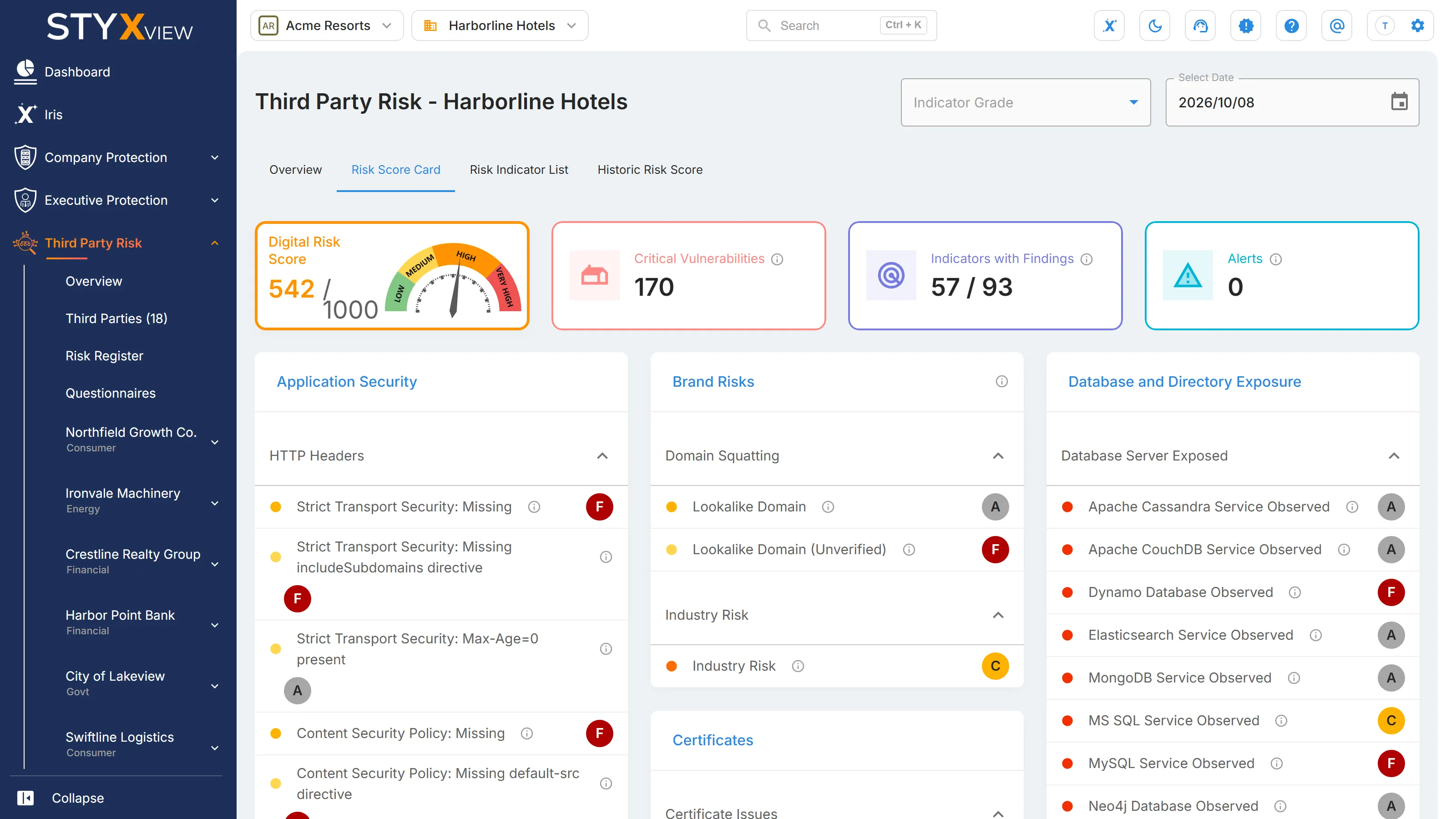
Below the tiles is one card for each risk category, with a section for each subcategory. Each row is one risk indicator:
- A coloured dot shows the indicator's severity.
- The info icon beside the name shows what the indicator measures.
- The letter on the right is the indicator's grade, from A (best) to F (worst).
Select an indicator to open its findings in a new tab, where a findings page exists for it. The "Asset Reputation", "Network Security", and "Data Leakage" card titles also open their pages.
To show only some grades, choose them in "Indicator Grade". To see an earlier date, use "Select Date".
At the bottom of the tab, "How the Digital Risk Score is Calculated" shows four reference cards: "Indicator Category Weights", "Digital Risk Score Calculation", "Indicator Severity", and "Indicator Grading". The next sections explain them.
The Calculation
Section titled “The Calculation”StyxView calculates the score in six steps, the same way for your organization and for every third party.
- Count the findings. For each risk indicator, StyxView counts its findings. Findings marked as false positives, and findings with the status Resolved, Closed Without Action, or No Longer Seen, are not counted.
- Grade the indicator. The count sets the indicator's grade, from A to F (see Risk Grade Interpretation).
- Turn the grade into points. Each indicator's points are its grade value, multiplied by its severity weight, multiplied by the maximum points of its category.
- Cap each category. The points of all indicators in a category are added up. If the total is above the category's maximum, the category counts only its maximum.
- Add the categories. The capped category totals add up to a score out of 1000.
- Adjust for size. If your organization has more than 250 active hosts, the score is multiplied by log(251) ÷ log(number of active hosts + 1) and rounded up. This stops a large attack surface from raising the score just because it is large. With 250 active hosts or fewer, the score is not adjusted.
The severity weights are fixed:
| Indicator severity | Weight |
|---|---|
| Critical | 100% |
| Very High | 75% |
| High | 50% |
| Medium | 30% |
| Low | 10% |
| Info | 0% |
An Info indicator never adds points, however many findings it has. The "Indicator Severity" card shows Very High as "V. High".
The maximum points of each category are its weight, out of 1000: 200 for Network Security and Patching Cadence; 100 for Asset Reputation, Certificates, Data Leakage, and Database and Directory Exposure; and 50 for Application Security, Brand Risks, DNS Health, and Disclosures. See Risk Score Categories and Weightages.
Risk Indicators Score Contributions
Section titled “Risk Indicators Score Contributions”An indicator's points are its "Score Contribution", shown on the Risk Indicator List:
Score Contribution = grade value × severity weight × category maximum
Two examples:
- "Server Vulnerabilities (Critical)" has Very High severity (75%) and belongs to Patching Cadence (200 points). With one finding it is graded C (30%): 30% × 75% × 200 = 45 points. With four or more findings it is graded F (100%): 100% × 75% × 200 = 150 points.
- "Strict Transport Security: Missing" has Medium severity (30%) and belongs to Application Security (50 points). Graded F: 100% × 30% × 50 = 15 points.
The category cap applies after this. If four Medium indicators in Application Security are each graded F, they add up to 60 points, but Application Security counts only its maximum of 50. Remediating findings in a category above its cap does not lower the score until the category total falls below the cap. The Risk Indicator List marks these indicators "At cap".
The size adjustment applies last. For example, a total of 600 for an organisation with 1000 active hosts becomes 600 × log(251) ÷ log(1001), rounded up: 480.
Risk Grade Interpretation
Section titled “Risk Grade Interpretation”Grades apply to individual risk indicators. The overall score uses the four risk bands instead (see Risk Score Overview).
| Grade | Grade value | Findings for most indicators | Meaning |
|---|---|---|---|
| A | 0% | 0 | No findings. The indicator adds no points. |
| B | 10% | 1 | Minor exposure. |
| C | 30% | 2 | Moderate exposure. |
| D | 50% | 3 | Elevated exposure. |
| E | 75% | 4 | High exposure. |
| F | 100% | 5 or more | The worst grade. The indicator adds its full points. |
The thresholds are set for each indicator and are the same for every organisation. Three indicators use different thresholds:
- "Server Vulnerabilities (Critical)": 1 finding is C, 2 is D, 3 is E, and 4 or more is F.
- "Client domain in a Third Party breach": 1 finding is E, and 2 or more is F.
- "Industry Risk" is graded A to E from the risk rating of your industry, not from findings. It adds at most 25 points and cannot be remediated.
Risk Indicator List
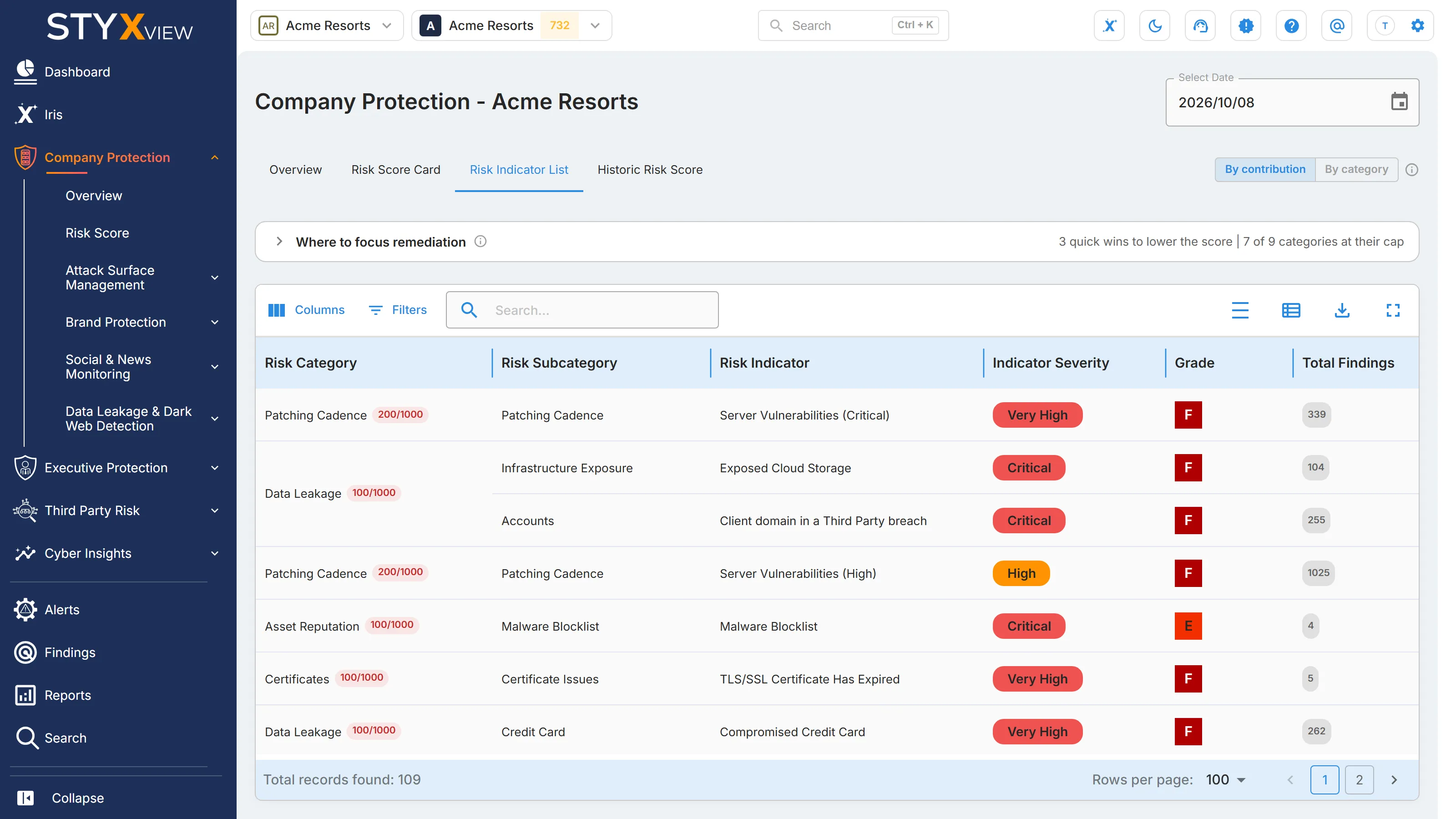
Section titled “Risk Indicator List”The "Risk Indicator List" tab of the Risk Score page lists every risk indicator in your Digital Risk Score, one row each, with the points it adds to the score. Use it to decide which findings to remediate first. For a third party, see Third Party Risk Indicator List.
What It Shows
Section titled “What It Shows”| Column | What it shows |
|---|---|
| "Risk Category" | The category the indicator belongs to, with a pill showing the points the whole category adds to your score, out of 1000. The pill is red when the category is at its cap. Hover over it for the category's weight, cap, and top contributors. |
| "Risk Subcategory" | A group of related indicators within the category. A subcategory has no weight of its own. |
| "Risk Indicator" | What is being measured, such as an expired certificate or an exposed database. |
| "Indicator Severity" | Critical, Very High, High, Medium, Low, or Info. Severity sets how many points the indicator can add. Info indicators add none. |
| "Grade" | From A (no findings) to F (worst), set by the indicator's number of findings. |
| "Total Findings" | The findings counted for the indicator. |
| "Score Contribution" | The points the indicator adds, out of 1000, before the category cap is applied. An asterisk (*) means the indicator's category is at its cap. |
| "Remediation" | What remediating the indicator would do for your score. See Where to Focus Remediation. |
| "Scored" | Hidden by default. "No" for Info indicators, which never add points. |
| "Observed" | Hidden by default. "Yes" when the indicator is graded B to F, that is, when it has findings. |
How grades and points are calculated is explained in The Calculation.
To work with the list:
-
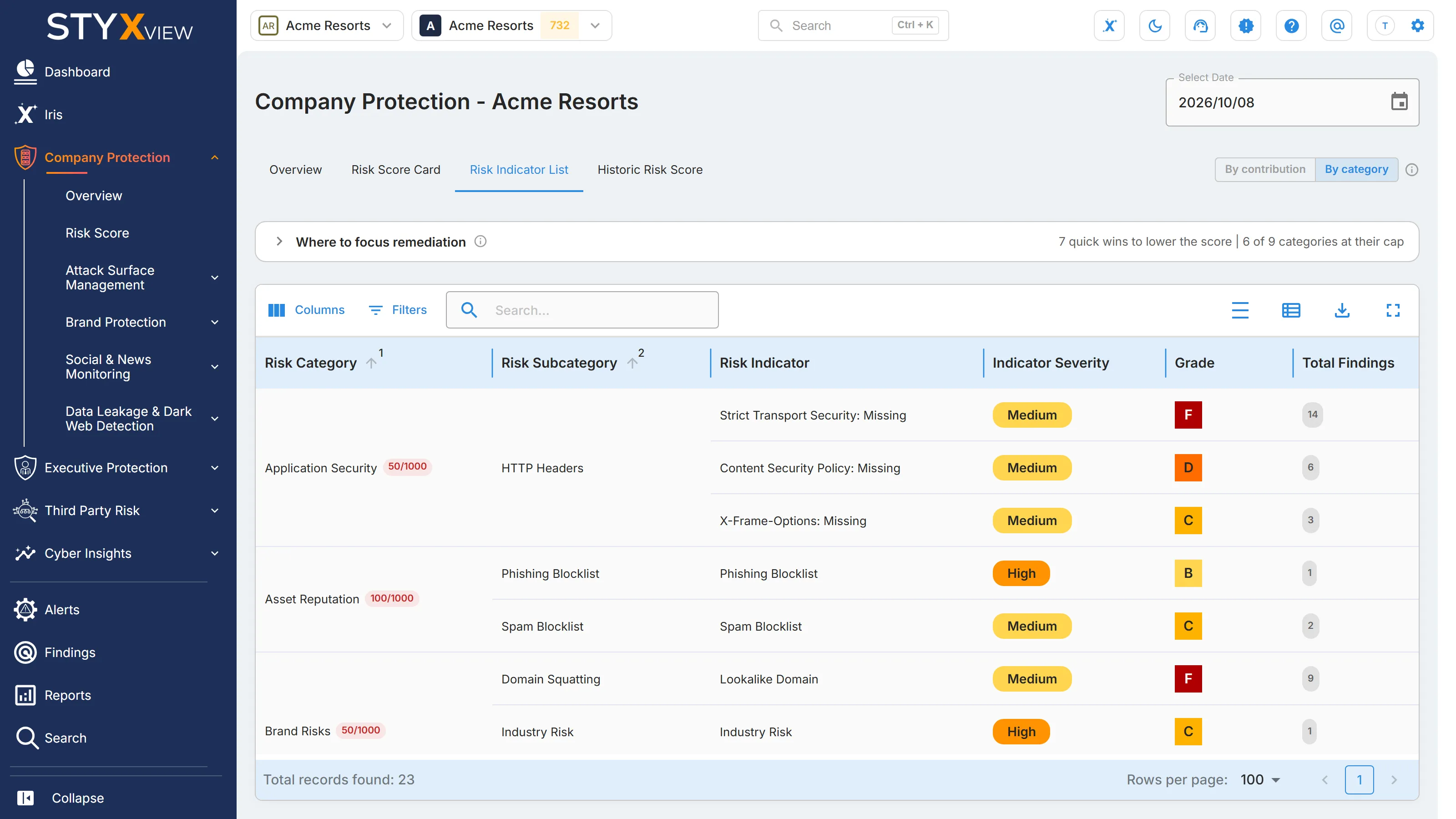
Choose a view with the switch beside the tabs. "By contribution", the default, lists every indicator with the highest "Score Contribution" first. "By category" groups the indicators by category and subcategory and shows only those graded B to F.
-
Select a row to open the indicator's findings in a new tab, where a findings page exists for it.
-
Use "Columns" and "Filters" to show the hidden columns or narrow the list, and "Export" to download it. The export also includes each category's cap.
-
Use "Select Date" to see the list on an earlier date.
Where to Focus Remediation
Section titled “Where to Focus Remediation”The "Where to focus remediation" panel above the list shows where remediation lowers your score now and where it does not. Collapsed, it shows how many quick wins you have and how many categories are at their cap. Select it to expand it:
- "Quick wins" lists up to six indicators whose category is still below its cap, ranked by the points removed for each finding remediated.
- "Categories at their cap" lists the categories already at or above their cap, with each category's weight and how far its points are over the cap.
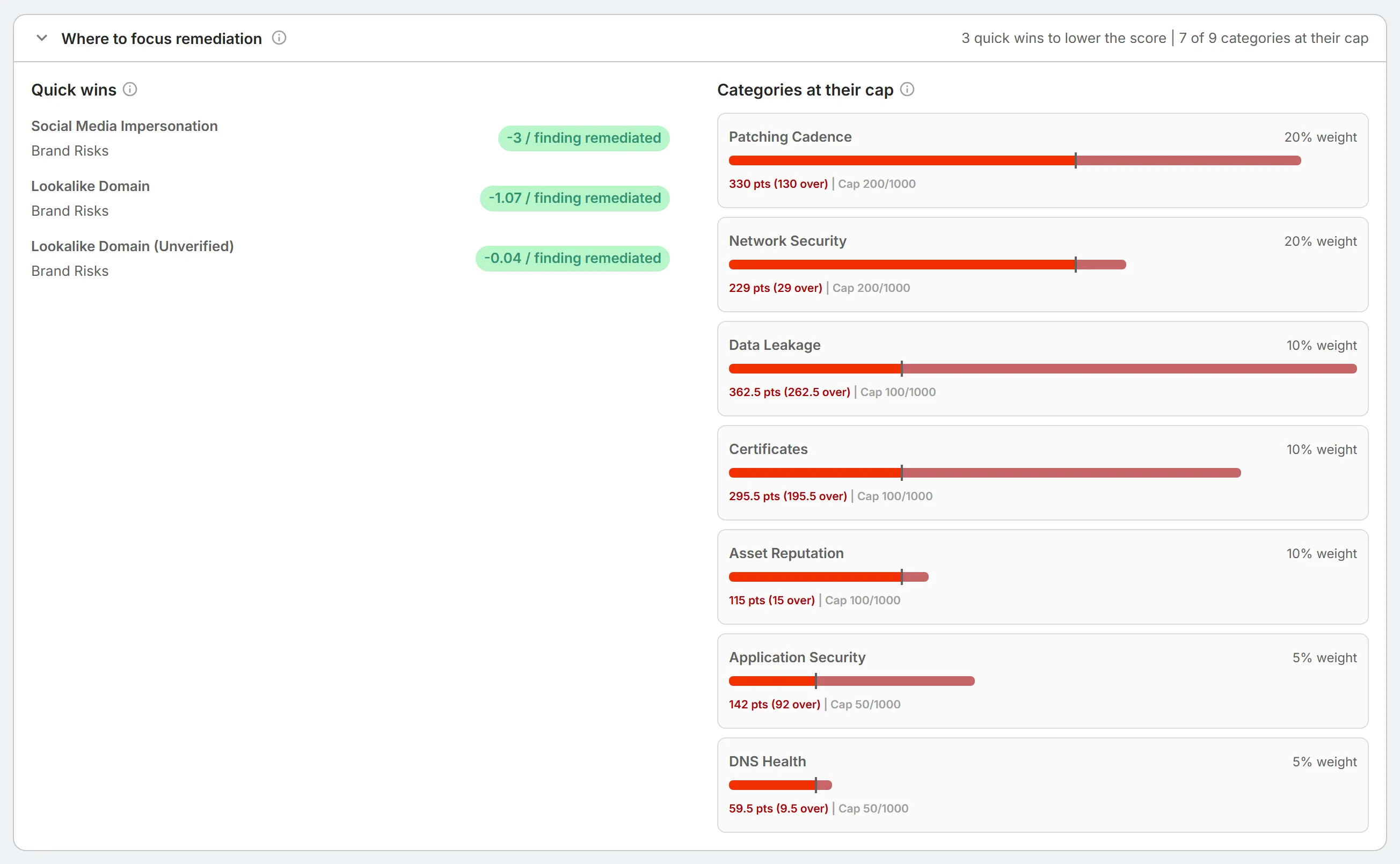
A category adds at most its cap to the score, however many findings it has. Remediating findings in a category above its cap does not lower the score until the category's points fall below the cap.
The "Remediation" column gives each indicator one of four values:
| Value | Meaning |
|---|---|
| "Quick win" | The indicator adds points and its category is below its cap, so remediating its findings lowers the score at the next scoring run. |
| "At cap" | The indicator adds points, but its category is at or above its cap, so remediating its findings has no immediate effect on the score. |
| "Static" | The Industry Risk indicator. It reflects the inherent cyber risk of your industry and cannot be remediated. |
| "No action" | The indicator is graded A or has no findings, so it adds no points. |
Risk Score Indicators
Section titled “Risk Score Indicators”These are the 109 risk indicators in the Digital Risk Score of your organization, grouped by category. "Severity" sets the most an indicator can add to the score: see Risk Indicators Score Contributions.
| Risk Category | Risk Subcategory | Risk Indicator | Severity | What it measures |
|---|---|---|---|---|
| Application Security | HTTP Headers | Strict Transport Security: Missing | Medium | The site sends no Strict-Transport-Security (HSTS) header, so browsers can be downgraded to unencrypted HTTP. |
| Application Security | HTTP Headers | Strict Transport Security: Missing includeSubdomains directive | Low | The HSTS header does not cover subdomains, so they can still be reached over unencrypted HTTP. |
| Application Security | HTTP Headers | Strict Transport Security: Max-Age=0 present | Low | The HSTS header sets max-age=0, which turns HSTS off. |
| Application Security | HTTP Headers | Content Security Policy: Missing | Medium | The site sends no Content Security Policy (CSP) header, which leaves it more exposed to cross-site scripting (XSS) and content injection. |
| Application Security | HTTP Headers | Content Security Policy: Missing default-src directive | Low | The CSP has no default-src directive, so resource types without their own rule have no fallback restriction. |
| Application Security | HTTP Headers | Content Security Policy: Missing object-src directive | Low | The CSP does not restrict plugin content with an object-src directive. |
| Application Security | HTTP Headers | Content Security Policy: Missing script-src directive | Low | The CSP does not restrict where scripts load from with a script-src directive, which raises XSS risk. |
| Application Security | HTTP Headers | Content Security Policy: Missing base-uri directive | Low | The CSP does not restrict the base URL with a base-uri directive, which can enable injection attacks. |
| Application Security | HTTP Headers | Content Security Policy: Unsafe-inline directive present | Low | The CSP allows inline scripts (unsafe-inline), which weakens its XSS protection. |
| Application Security | HTTP Headers | Content Security Policy: Unsafe-eval directive present | Low | The CSP allows dynamic code execution (unsafe-eval), which weakens its XSS protection. |
| Application Security | HTTP Headers | Content Security Policy: Object-src '*' directive present | Low | The CSP allows plugin content from any source (object-src *). |
| Application Security | HTTP Headers | Content Security Policy: Script-src https://127.0.0.1 directive present | Low | The CSP allows scripts from localhost, a sign of development settings left in production. |
| Application Security | HTTP Headers | Content Security Policy: Report-uri directive present | Low | The CSP includes a report-uri directive, which can mean violations are reported rather than blocked. |
| Application Security | HTTP Headers | Content Security Policy: 'Script-src http:' directive present | Low | The CSP allows scripts to load over unencrypted HTTP. |
| Application Security | HTTP Headers | X Content Type Options: Missing | Medium | The site sends no X-Content-Type-Options header, so browsers may guess the type of a file (MIME sniffing). |
| Application Security | HTTP Headers | X Content Type Options: Missing nosniff directive | Low | The X-Content-Type-Options header is not set to nosniff, so browsers may misread file types. |
| Application Security | HTTP Headers | X-Frame-Options: Missing | Medium | The site sends no X-Frame-Options header, which leaves it open to clickjacking. |
| Application Security | HTTP Headers | X-Frame-Options: ALLOW-FROM directive present | Low | X-Frame-Options uses the deprecated ALLOW-FROM value, which most browsers ignore. |
| Application Security | HTTP Headers | X XSS Protection: Missing | Medium | The site sends no X-XSS-Protection header, so the browser applies no basic XSS filtering. |
| Application Security | HTTP Headers | X XSS Protection: Missing 1 and mode=block | Low | The X-XSS-Protection header is present but not set to 1; mode=block. |
| Application Security | HTTP Headers | Referrer Policy: Missing | Medium | The site sends no Referrer-Policy header, so full URLs may be shared with other sites. |
| Application Security | HTTP Headers | Referrer Policy: Unsafe-url directive present | Low | Referrer-Policy is set to unsafe-url, which sends the full URL with every request. |
| Application Security | HTTP Headers | Referrer Policy: Origin-when-cross-origin directive present | Low | Referrer-Policy is set to origin-when-cross-origin, which still shares your origin with other sites. |
| Application Security | HTTP Headers | Permissions Policy: Missing | Medium | The site sends no Permissions-Policy header to restrict browser features such as the camera and location. |
| Asset Reputation | Abuse Blocklist | Abuse Blocklist | High | Your IP addresses or domains are listed on an abuse blocklist. |
| Asset Reputation | Exploit Blocklist | Exploit Blocklist | Critical | Your IP addresses or domains are listed on an exploit blocklist, a sign of compromise or active targeting. |
| Asset Reputation | Malware Blocklist | Malware Blocklist | Critical | Your IP addresses or domains are listed on a malware blocklist, a sign of infection or malware distribution. |
| Asset Reputation | Phishing Blocklist | Phishing Blocklist | High | Your IP addresses or domains are listed on a phishing blocklist. |
| Asset Reputation | Spam Blocklist | Spam Blocklist | Medium | Your IP addresses or domains are listed on a spam blocklist, which can hurt email deliverability. |
| Brand Risks | Domain Squatting | Lookalike Domain | Medium | Domains resembling yours that are confirmed as infringing your brand ("Infringement Detected"). |
| Brand Risks | Domain Squatting | Lookalike Domain (Unverified) | Low | Domains resembling yours that are not yet confirmed as infringing. |
| Brand Risks | Industry Risk | Industry Risk | High | The inherent cyber risk of your industry. Graded A to E from your industry's risk rating, it adds at most 25 points and cannot be remediated. |
| Brand Risks | Negative Sentiment News | Negative News Sentiment | Low | News articles about your organization with negative sentiment, posted in the last month. |
| Brand Risks | Negative Sentiment Social | Negative Social Sentiment | Low | Social media posts about your organization with negative sentiment, posted in the last month. |
| Brand Risks | Phishing and Evil-Twin Website | Phishing and Evil-Twin Website (Unverified) | Info | Possible phishing or evil-twin copies of your websites, not yet confirmed. |
| Brand Risks | Reverse Logo Search | Reverse Logo Search (Unverified) | Info | Your logo found on other websites, not yet confirmed as misuse. |
| Brand Risks | Rogue Mobile Apps | Rogue Mobile App (unverified) | Info | Mobile apps that may use your brand without authorisation, not yet confirmed. |
| Brand Risks | Scam Exposition Website | Scam Exposition Website (Unverified) | Info | Mentions of your organization on scam-reporting websites, not yet confirmed. |
| Brand Risks | Social Media Account Impersonation | Social Media Impersonation | Medium | Social media accounts confirmed as impersonating your organization or its people. |
| Brand Risks | Social Media Account Impersonation | Social Media Impersonation (unverified) | Info | Possible impersonating social media accounts, not yet confirmed. |
| Brand Risks | Unauthorized Job Postings | Unauthorized Job Posting (unverified) | Info | Job postings that may use your brand without authorisation, not yet confirmed. |
| Brand Risks | Web Beacon | Web Beacon (Unverified) | Info | Your web beacon was detected on a page that is not on your allowlist. |
| Brand Risks | Web Referrer Log | Web Referrer Log (Unverified) | Info | Visitors reached your site from a referring source that is not on your allowlist. |
| Certificates | Certificate Issues | TLS/SSL Certificate Has Expired | Very High | A certificate on your hosts has expired. |
| Certificates | Certificate Issues | TLS/SSL Certificate is revoked | High | The issuing certificate authority has revoked the certificate. |
| Certificates | Certificate Issues | TLS/SSL Certificate is self-signed | High | The certificate is self-signed, so clients cannot verify it. |
| Certificates | Certificate Issues | TLS/SSL Certificate lifetime is longer than best practice | Low | The certificate is valid for longer than current best practice. |
| Certificates | Certificate Issues | TLS/SSL Certificate Mismatch | Medium | The certificate does not match the host name it protects. |
| Certificates | Certificate Issues | TLS/SSL Certificate without revocation mechanism | Low | The certificate offers no way to check whether it has been revoked (OCSP or CRL). |
| Certificates | Server Issues | TLS/SSL Certificate weak cipher | Medium | The server accepts weak encryption ciphers. |
| Certificates | Server Issues | Weak Protocol SSLv3 in Use | Critical | The server accepts SSLv3, which is vulnerable to the POODLE attack. |
| Certificates | Server Issues | Weak Protocol TLSv1.0 in Use | Medium | The server accepts TLS 1.0, which is deprecated. |
| Certificates | Server Issues | Weak Protocol TLSv1.1 in Use | Low | The server accepts TLS 1.1, which is deprecated. Use TLS 1.2 or later. |
| Certificates | Server Issues | TLS/SSL Certificate Incomplete certificate chain | Low | The server does not send the full certificate chain, which can cause trust failures. |
| Certificates | Server Issues | TLS/SSL Certificate Expiring Soon | Low | A certificate is close to its expiry date. |
| Certificates | Server Issues | SSL/TLS Service Supports Very Weak Protocol | Very High | The server accepts a severely outdated SSL or TLS protocol version. |
| Data Leakage | Accounts | Client email in a Third Party breach | High | Email addresses on your domains found in data breaches at other organisations. |
| Data Leakage | Accounts | Client domain in a Third Party breach | Critical | Your domains found in data breaches at other organisations. |
| Data Leakage | Credit Card | Compromised Credit Card | Very High | Payment cards matching your Bank Identification Numbers (BIN) found on dark web marketplaces. |
| Data Leakage | Dark Web | Dark Web Mention | Very High | Mentions of your organization on dark web forums, marketplaces, and channels. |
| Data Leakage | Data Breach | Data Breach | Critical | Evidence that your organization's domains or systems were involved in a data breach. |
| Data Leakage | Infrastructure Exposure | Exposed Cloud Storage | Critical | Publicly accessible cloud storage, such as AWS S3, Azure Blob, or Google Cloud Storage buckets, linked to your organization. |
| Data Leakage | Infrastructure Exposure | Exposed Code Repo | Info | Public code repositories that may expose your source code, credentials, or other sensitive data. |
| Database and Directory Exposure | Database Server Exposed | Apache Cassandra Service Observed | Very High | An Apache Cassandra database reachable from the internet. |
| Database and Directory Exposure | Database Server Exposed | Apache CouchDB Service Observed | Very High | An Apache CouchDB database reachable from the internet. |
| Database and Directory Exposure | Database Server Exposed | Dynamo Database Observed | Very High | An Amazon DynamoDB database reachable from the internet. |
| Database and Directory Exposure | Database Server Exposed | Elasticsearch Service Observed | Very High | An Elasticsearch cluster reachable from the internet. |
| Database and Directory Exposure | Database Server Exposed | MongoDB Service Observed | Very High | A MongoDB database reachable from the internet. |
| Database and Directory Exposure | Database Server Exposed | MS SQL Service Observed | Very High | A Microsoft SQL Server database reachable from the internet. |
| Database and Directory Exposure | Database Server Exposed | MySQL Service Observed | Very High | A MySQL database reachable from the internet. |
| Database and Directory Exposure | Database Server Exposed | Neo4j Database Observed | Very High | A Neo4j graph database reachable from the internet. |
| Database and Directory Exposure | Database Server Exposed | Oracle Database Observed | Very High | An Oracle database reachable from the internet. |
| Database and Directory Exposure | Database Server Exposed | PostgreSQL Service Observed | Very High | A PostgreSQL database reachable from the internet. |
| Database and Directory Exposure | Database Server Exposed | Redis Service Observed | Very High | A Redis data store reachable from the internet. |
| Database and Directory Exposure | Directory Services | LDAP Service Observed | Very High | An LDAP directory service reachable from the internet. |
| DNS Health | Domain Health | Domain Without Backup Mail Server | Medium | The domain has no backup mail server, so mail delivery stops if its only mail server fails. |
| DNS Health | Domain Health | Domain Without Backup Name Server | Medium | The domain has no backup name server, so it stops resolving if its only name server fails. |
| DNS Health | Email Security | DKIM Record Not Found | Info | No DomainKeys Identified Mail (DKIM) record was found for the domain. |
| DNS Health | Email Security | DMARC Record Not Found | Medium | The domain publishes no Domain-based Message Authentication, Reporting, and Conformance (DMARC) policy. |
| DNS Health | Email Security | Mail Server PTR Mismatch | Low | The mail server's PTR (reverse DNS) record does not match its IP address, which can hurt deliverability. |
| DNS Health | Email Security | Mail Server PTR Not Configured | Low | The mail server has no PTR (reverse DNS) record, which can hurt deliverability. |
| DNS Health | Email Security | SPF Record Not Found | Very High | The domain publishes no Sender Policy Framework (SPF) record, so anyone can send mail that appears to come from it. |
| DNS Health | Email Security | SPF Record Contains Wildcard | Low | The SPF record contains a wildcard, which can authorise unintended senders. |
| DNS Health | Email Security | SPF Record contains a Softfail | Low | The SPF record ends in softfail (~all), so mail that fails the check is marked rather than rejected. |
| Network Security | Exposed Internal IP Network | Internal IP Address/Range Exposed | Low | Internal (private) IP addresses or ranges are publicly visible, which reveals your network layout. |
| Network Security | Insecure Protocols | SSH Server Supports Vulnerable Protocol | High | The SSH server accepts an outdated protocol version. |
| Network Security | Insecure Protocols | SSH Server Supports Weak Cipher | Medium | The SSH server accepts weak encryption ciphers. |
| Network Security | Insecure Protocols | SSH Server Supports Weak MAC Algorithm | Medium | The SSH server accepts weak message authentication code (MAC) algorithms. |
| Network Security | Insecure Service | DNS Service Observed (53) | Info | A DNS server reachable from the internet on port 53. |
| Network Security | Insecure Service | IMAP Service Observed (143, 993) | Medium | An IMAP mail service reachable from the internet. |
| Network Security | Insecure Service | OpenVPN Service Observed (1194) | Medium | An OpenVPN service reachable from the internet. |
| Network Security | Insecure Service | Other Potentially Insecure Ports | Medium | Other open ports commonly associated with risk when reachable from the internet. |
| Network Security | Insecure Service | POP3 Service Observed (110, 995) | Medium | A POP3 mail service reachable from the internet. |
| Network Security | Insecure Service | PPTP Service Observed (1723) | Medium | A PPTP VPN service, which uses an insecure, deprecated protocol. |
| Network Security | Insecure Service | Pulse Connect Secure VPN Product Observed (6514) | Medium | A Pulse Connect Secure VPN gateway reachable from the internet. |
| Network Security | Insecure Service | Rsync Service Observed (873) | Medium | An rsync file synchronisation service reachable from the internet. |
| Network Security | Insecure Service | SMB Service Observed (139, 445) | Medium | A Server Message Block (SMB) file-sharing service reachable from the internet. |
| Network Security | Insecure Service | SOAP Server Observed | Info | A SOAP web service reachable from the internet. |
| Network Security | Insecure Service | Telnet Service Observed (23) | Medium | A Telnet service, which sends credentials in plain text. |
| Network Security | Insecure Service | UPnP Service (1900) | Low | A Universal Plug and Play (UPnP) service reachable from the internet. |
| Network Security | Insecure Service | VNC Service Observed (5800, 5900) | Medium | A Virtual Network Computing (VNC) remote desktop service reachable from the internet. |
| Network Security | Insecure Service | VoIP Service Observed (5060) | Info | A Voice over IP (VoIP) service reachable from the internet. |
| Network Security | Remote Access Service | FTP Service Observed (21) | High | An FTP file transfer service reachable from the internet. |
| Network Security | Remote Access Service | RDP Service Observed (3389) | Very High | A Remote Desktop Protocol (RDP) service reachable from the internet. |
| Network Security | Remote Access Service | SSH Service Observed (22) | High | An SSH service reachable from the internet. |
| Patching Cadence | Patching Cadence | Server Vulnerabilities (Critical) | Very High | Known vulnerabilities rated Critical on your servers. |
| Patching Cadence | Patching Cadence | Server Vulnerabilities (High) | High | Known vulnerabilities rated High on your servers. |
| Patching Cadence | Patching Cadence | Server Vulnerabilities (Medium) | Medium | Known vulnerabilities rated Medium on your servers. |
| Patching Cadence | Patching Cadence | Server Vulnerabilities (Low) | Low | Known vulnerabilities rated Low on your servers. |
Frequently Asked Questions
Section titled “Frequently Asked Questions”-
What is the Digital Risk Score?
A rating of an organization's external digital risk from 0 to 1000, where higher is worse. Scores fall into four bands: Low (0 to 199), Medium (200 to 399), High (400 to 749), and Very High (750 to 1000). See Risk Score Overview. -
How is the score calculated?
Each risk indicator is graded A to F by its number of findings. The grade, the indicator's severity, and the weight of its category set the indicator's points. Each category is capped at its weight, the capped categories are added up to a score out of 1000, and the score is adjusted for organisations with more than 250 active hosts. See The Calculation. -
How often is the score updated?
Every four hours. To see an earlier score, use "Select Date". To compare two scoring runs, use the Historic Risk Score tab. -
Which findings count toward the score?
Every finding on a risk indicator, except findings marked as false positives and findings with the status Resolved, Closed Without Action, or No Longer Seen. -
What contributes most to my score?
Network Security and Patching Cadence carry the most weight, at 200 points each. Within a category, indicators with Critical or Very High severity and a grade of F add the most. To see your own largest contributors, sort this list by "Score Contribution" or open "Key Risk Indicators" on the "Overview" tab. -
I remediated findings. Why has my score not dropped?
There are three common reasons. The score changes only at the next scoring run, after the findings' status has changed. The indicator's grade may not have changed, because it is set by thresholds: an indicator with eight findings is still graded F after you remediate two. Or the indicator's category is above its cap, so its points must fall below the cap before the score moves. The "Remediation" column marks these indicators "At cap". -
Does the size of my organisation affect the score?
Grades do not: an indicator's thresholds are the same for every organisation. The total score does: if your organization has more than 250 active hosts, the score is scaled down so that a large attack surface does not raise it just because it is large. -
How is a third party's score different?
It is calculated the same way, with the same categories and weights. A third party's Risk Indicator List shows fewer indicators than your own. See Third Party Risk Indicator List. -
Where can I see the score?
On the dashboard, and on the Risk Score page: select "Company Protection" and then "Risk Score" in the sidebar. For a third party, select "Third Party Risk", the third party, and then "Risk Score".
In a third party
Section titled “In a third party”The "Risk Indicator List" breaks a third party's Digital Risk Score down into the individual signals, called risk indicators, that StyxView evaluates. For each indicator it shows how many findings there are, the grade they earn, and how many points they add to the score.
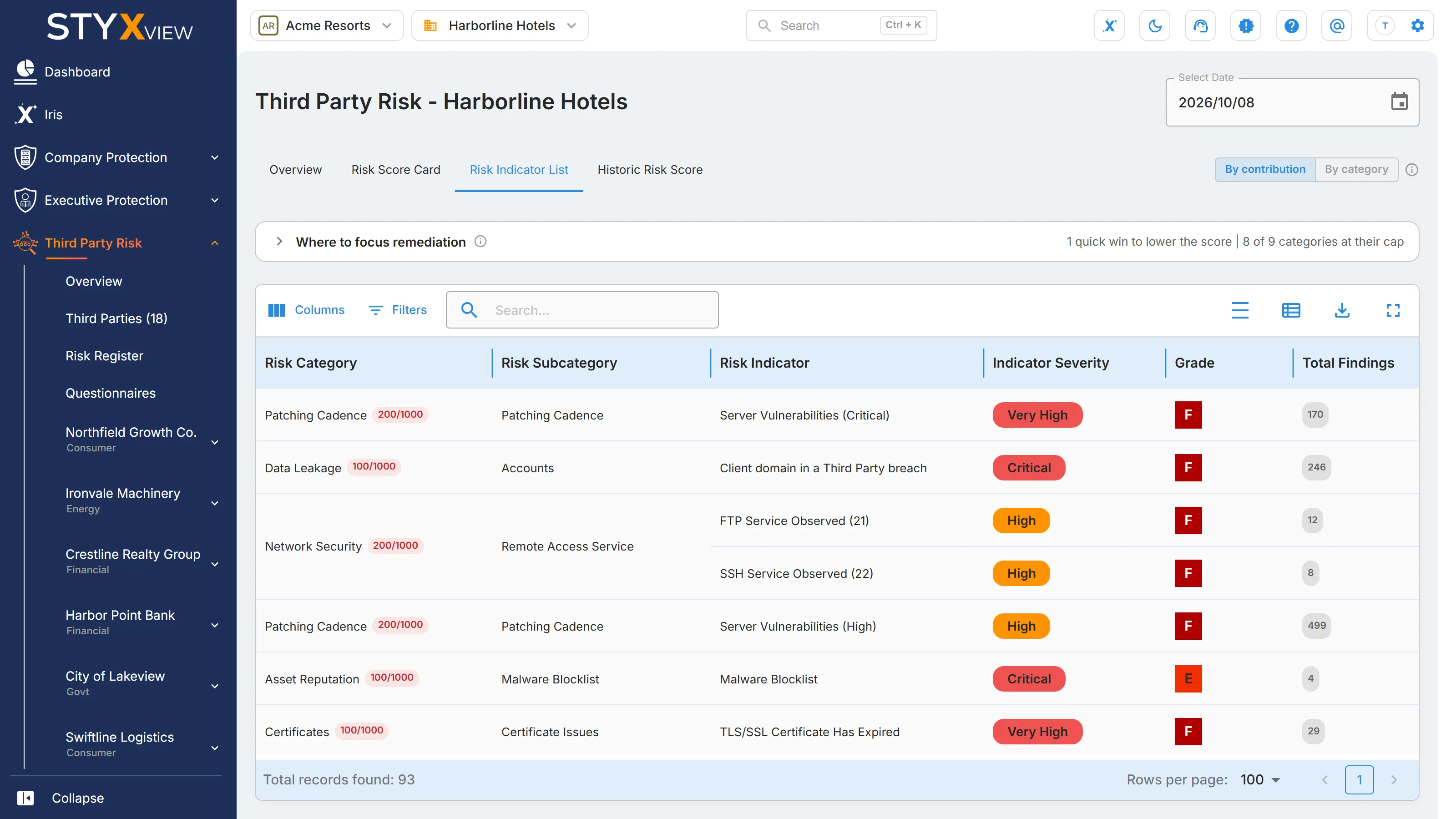
To open it, select Third Party Risk → a third party → Risk Score, then the "Risk Indicator List" tab. You can also select "View More" under "Key Risk Indicators", or a category under "Risk Categories", on the third party's dashboard.
The list is for the date in "Select Date", which defaults to the latest score. Choose an earlier date to see the list as it was then.
What it shows
Section titled “What it shows”| Column | What it shows |
|---|---|
| "Risk Category" | The top-level risk area, with a pill showing the category's contribution to the score out of 1000. Each category is capped at its weight. |
| "Risk Subcategory" | A group of related indicators within the category. It has no weight of its own. |
| "Risk Indicator" | The name of the indicator, for example an expired certificate or an exposed service. |
| "Indicator Severity" | How damaging the indicator is if triggered, from "Info" up to "Critical". Severity scales how much each finding moves the score. |
| "Grade" | A grade from A (clean) to F (worst), set by comparing the number of findings with thresholds set for that indicator. |
| "Total Findings" | The number of live findings for the indicator. |
| "Score Contribution" | The points the indicator adds to the score, out of 1000. An asterisk means its category is already at its cap. |
| "Remediation" | What remediating the indicator would do. See below. |
| "Scored" | Whether the indicator counts toward the score. "No" means it is informational only ("Info" severity). Hidden by default. |
| "Observed" | Whether the indicator is currently triggered, meaning its grade is worse than A. Hidden by default. |
Hover over a category, subcategory, severity, grade, or contribution to see how it was worked out. Select a row to open the findings behind that indicator in a new tab.
| Remediation | Meaning |
|---|---|
| "Quick win" | The indicator's category is below its cap, so remediating its findings lowers the score straight away. |
| "At cap" | The category is already at its cap, so remediating findings here has no effect on the score until the category total drops below the cap. |
| "Static" | The indicator reflects inherent industry risk. It counts toward the score but cannot be remediated. |
| "No action" | There is nothing to remediate. |
Above the table, "Where to focus remediation" lists the categories at their cap and the quick wins, ranked by how much score each finding remediated removes. Use the "By contribution" and "By category" buttons to sort the list by score contribution or group it by category.
Risk score indicators
Section titled “Risk score indicators”Risk indicators are technical and contextual signals that measure an organisation's exposure to cyber threats. They come from:
- Infrastructure configurations and exposed services.
- Compromised assets and credentials.
- Threat actor activity.
- Brand and reputation signals.
StyxView collects these signals from the surface, deep, and dark web and from open-source and proprietary intelligence feeds. Together they make up the Digital Risk Score, which helps you prioritise remediation, follow trends, and judge a third party's security posture.
The table below lists the indicators StyxView evaluates for a third party. Indicators with "Info" severity are informational and do not count toward the score. For the indicators evaluated for your own organisation, see Risk Indicator List.
| Risk Category | Risk Subcategory | Risk Indicator | Description |
|---|---|---|---|
| Application Security | HTTP Headers | Content Security Policy: Missing | The site sends no Content-Security-Policy header, which leaves it more exposed to cross-site scripting (XSS) and content injection. |
| Application Security | HTTP Headers | Content Security Policy: Missing base-uri directive | The Content-Security-Policy has no base-uri directive, so the page's base URL can be changed to enable injection attacks. |
| Application Security | HTTP Headers | Content Security Policy: Missing default-src directive | The Content-Security-Policy has no default-src directive, so there is no fallback rule for loading resources. |
| Application Security | HTTP Headers | Content Security Policy: Missing object-src directive | The Content-Security-Policy has no object-src directive, so untrusted plugin content can load. |
| Application Security | HTTP Headers | Content Security Policy: Missing script-src directive | The Content-Security-Policy has no script-src directive, so script sources are not restricted, which raises XSS risk. |
| Application Security | HTTP Headers | Content Security Policy: Object-src '*' directive present | The Content-Security-Policy allows plugin content from any source. |
| Application Security | HTTP Headers | Content Security Policy: Report-uri directive present | The Content-Security-Policy includes a report-uri directive, which suggests violations may be logged rather than blocked. |
| Application Security | HTTP Headers | Content Security Policy: 'Script-src http:' directive present | The Content-Security-Policy allows scripts to load over unencrypted HTTP. |
| Application Security | HTTP Headers | Content Security Policy: Script-src https://127.0.0.1 directive present | The Content-Security-Policy allows scripts from localhost, a sign of development or test settings left in production. |
| Application Security | HTTP Headers | Content Security Policy: Unsafe-eval directive present | The Content-Security-Policy allows unsafe-eval, so code can be run dynamically, which increases XSS exposure. |
| Application Security | HTTP Headers | Content Security Policy: Unsafe-inline directive present | The Content-Security-Policy allows unsafe-inline, so inline scripts can run, which creates XSS risk. |
| Application Security | HTTP Headers | Permissions Policy: Missing | The site sends no Permissions-Policy header, so use of sensitive browser features is not restricted. |
| Application Security | HTTP Headers | Referrer Policy: Missing | The site sends no Referrer-Policy header, so full URLs may leak to other sites. |
| Application Security | HTTP Headers | Referrer Policy: Origin-when-cross-origin directive present | The Referrer-Policy is origin-when-cross-origin, which limits referrer information but still reveals the site's origin. |
| Application Security | HTTP Headers | Referrer Policy: Unsafe-url directive present | The Referrer-Policy is unsafe-url, which sends full URLs to every site. |
| Application Security | HTTP Headers | Strict Transport Security: Max-Age=0 present | The Strict-Transport-Security header sets max-age=0, which turns it off and allows protocol downgrade attacks. |
| Application Security | HTTP Headers | Strict Transport Security: Missing | The site sends no Strict-Transport-Security (HSTS) header, which exposes it to protocol downgrade and interception attacks. |
| Application Security | HTTP Headers | Strict Transport Security: Missing includeSubdomains directive | The HSTS header has no includeSubDomains directive, so subdomains can still be reached over insecure connections. |
| Application Security | HTTP Headers | X Content Type Options: Missing | The site sends no X-Content-Type-Options header, so browsers may guess content types, which risks content-type confusion attacks. |
| Application Security | HTTP Headers | X Content Type Options: Missing nosniff directive | The X-Content-Type-Options header lacks the nosniff value, so browsers may misread file types. |
| Application Security | HTTP Headers | X-Frame-Options: ALLOW-FROM directive present | The X-Frame-Options header uses the deprecated ALLOW-FROM directive, which offers weak protection. |
| Application Security | HTTP Headers | X-Frame-Options: Missing | The site sends no X-Frame-Options header, which leaves it open to clickjacking. |
| Application Security | HTTP Headers | X XSS Protection: Missing | The site sends no X-XSS-Protection header, so the browser's basic XSS filtering is not turned on. |
| Application Security | HTTP Headers | X XSS Protection: Missing 1 and mode=block | The X-XSS-Protection header is set, but not to block mode, so reflected XSS attacks are not blocked. |
| Asset Reputation | Abuse Blocklist | Abuse Blocklist | The third party's assets appear on abuse blocklists, which can indicate compromise or malicious activity. |
| Asset Reputation | Exploit Blocklist | Exploit Blocklist | The third party's assets appear on exploit blocklists, which can mean they are actively targeted or exploitable. |
| Asset Reputation | Malware Blocklist | Malware Blocklist | The third party's assets appear on malware blocklists, which can indicate infection or links to malware distribution. |
| Asset Reputation | Phishing Blocklist | Phishing Blocklist | The third party's assets appear on phishing blocklists, which can indicate compromised systems used for phishing. |
| Asset Reputation | Spam Blocklist | Spam Blocklist | The third party's assets appear on spam blocklists, which can affect email delivery and indicate compromised mail systems. |
| Brand Risks | Domain Squatting | Lookalike Domain | Registered domains that closely resemble the third party's domains and could be used for impersonation. |
| Brand Risks | Domain Squatting | Lookalike Domain (Unverified) | Possible lookalike domains that have not yet been verified as threats. |
| Brand Risks | Industry Risk | Industry Risk | An addition to the score for the inherent cyber and brand risk of the third party's industry. Some industries are targeted more than others. |
| Brand Risks | Phishing and Evil-Twin Website | Phishing and Evil-Twin Website (Unverified) | Possible phishing or evil-twin websites imitating the third party that have not yet been verified. |
| Brand Risks | Reverse Logo Search | Reverse Logo Search (Unverified) | Uses of the third party's logo found on the surface web that have not yet been verified. |
| Brand Risks | Scam Exposition Website | Scam Exposition Website (Unverified) | Mentions of the third party's name in scam databases that have not yet been verified. |
| Brand Risks | Web Beacon | Web Beacon (Unverified) | A web beacon detected on an unauthorised page, not yet verified. |
| Brand Risks | Web Referrer Log | Web Referrer Log (Unverified) | Web traffic referred from an unauthorised source, not yet verified. |
| Certificates | Certificate Issues | TLS/SSL Certificate Has Expired | An expired TLS/SSL certificate, which can disrupt services and push users to insecure connections. |
| Certificates | Certificate Issues | TLS/SSL Certificate is revoked | A certificate revoked by its certificate authority, which can indicate compromise or a policy violation. |
| Certificates | Certificate Issues | TLS/SSL Certificate is self-signed | A self-signed certificate, which clients do not trust and which can make interception easier. |
| Certificates | Certificate Issues | TLS/SSL Certificate lifetime is longer than best practice | A certificate valid for longer than current good practice recommends. |
| Certificates | Certificate Issues | TLS/SSL Certificate Mismatch | A certificate that does not match the domain it protects, which points to a misconfiguration. |
| Certificates | Certificate Issues | TLS/SSL Certificate without revocation mechanism | A certificate without a revocation check, such as OCSP or a certificate revocation list, so its revocation cannot be confirmed. |
| Certificates | Server Issues | SSL/TLS Service Supports Very Weak Protocol | A service that supports extremely outdated SSL/TLS protocols. |
| Certificates | Server Issues | TLS/SSL Certificate Expiring Soon | A certificate close to expiry. Renewing it avoids disruption. |
| Certificates | Server Issues | TLS/SSL Certificate Incomplete certificate chain | A certificate served without its full chain, which can cause trust failures. |
| Certificates | Server Issues | TLS/SSL Certificate weak cipher | A certificate set up with weak encryption ciphers, which are open to cryptographic attacks. |
| Certificates | Server Issues | Weak Protocol SSLv3 in Use | A service that still supports SSLv3, which is vulnerable to the POODLE attack. |
| Certificates | Server Issues | Weak Protocol TLSv1.0 in Use | A service that supports TLS 1.0, a deprecated protocol without modern security features. |
| Certificates | Server Issues | Weak Protocol TLSv1.1 in Use | A service that supports TLS 1.1, which is outdated. TLS 1.2 or later is recommended. |
| Database and Directory Exposure | Database Server Exposed | Apache Cassandra Service Observed | A Cassandra database reachable from the internet, which risks unauthorised access to its data. |
| Database and Directory Exposure | Database Server Exposed | Apache CouchDB Service Observed | A CouchDB database reachable from the internet, which risks unauthorised access to its data. |
| Database and Directory Exposure | Database Server Exposed | Dynamo Database Observed | A DynamoDB database reachable from the internet, which risks unauthorised access to its data. |
| Database and Directory Exposure | Database Server Exposed | Elasticsearch Service Observed | An Elasticsearch cluster reachable from the internet, which risks unauthorised access to its data. |
| Database and Directory Exposure | Database Server Exposed | MongoDB Service Observed | A MongoDB database reachable from the internet, which risks unauthorised access to its data. |
| Database and Directory Exposure | Database Server Exposed | MS SQL Service Observed | A Microsoft SQL Server database reachable from the internet, which risks unauthorised access to its data. |
| Database and Directory Exposure | Database Server Exposed | MySQL Service Observed | A MySQL database reachable from the internet, which risks unauthorised access to its data. |
| Database and Directory Exposure | Database Server Exposed | Neo4j Database Observed | A Neo4j database reachable from the internet, which risks unauthorised access to its data. |
| Database and Directory Exposure | Database Server Exposed | Oracle Database Observed | A Oracle database reachable from the internet, which risks unauthorised access to its data. |
| Database and Directory Exposure | Database Server Exposed | PostgreSQL Service Observed | A PostgreSQL database reachable from the internet, which risks unauthorised access to its data. |
| Database and Directory Exposure | Database Server Exposed | Redis Service Observed | A Redis instance reachable from the internet, which can expose cached data or serve as an entry point. |
| Data Leakage | Accounts | Client domain in a Third Party breach | The third party's domains found in breach data from other organisations. |
| Data Leakage | Accounts | Client email in a Third Party breach | Email addresses at the third party's domains found in breach data from other organisations. |
| Data Leakage | Dark Web | Dark Web Mention | Mentions of the third party on dark web forums, marketplaces, and channels, which can indicate threat actor interest. |
| DNS Health | Domain Health | Domain Without Backup Mail Server | A domain with no backup mail server, so email stops if the only one fails. |
| DNS Health | Domain Health | Domain Without Backup Name Server | A domain with no backup name server, so it can go offline if the only one fails. |
| DNS Health | Email Security | DKIM Record Not Found | A domain without a DomainKeys Identified Mail (DKIM) record, which helps prevent email spoofing. |
| DNS Health | Email Security | DMARC Record Not Found | A domain without a Domain-based Message Authentication, Reporting, and Conformance (DMARC) policy. |
| DNS Health | Email Security | Mail Server PTR Mismatch | A mail server whose reverse DNS (PTR) record does not match its address, which can hurt email delivery. |
| DNS Health | Email Security | Mail Server PTR Not Configured | A mail server with no reverse DNS (PTR) record, which can hurt email reputation and delivery. |
| DNS Health | Email Security | SPF Record contains a Softfail | A Sender Policy Framework (SPF) record that ends in softfail, which may not stop spoofed email. |
| DNS Health | Email Security | SPF Record Contains Wildcard | An SPF record with a wildcard, which may let unauthorised servers send email for the domain. |
| DNS Health | Email Security | SPF Record Not Found | A domain without an SPF record, which helps stop unauthorised senders spoofing it. |
| Network Security | Exposed Internal IP Network | Internal IP Address/Range Exposed | Internal IP addresses or ranges exposed publicly, which can reveal the network's layout. |
| Network Security | Insecure Protocols | SSH Server Supports Vulnerable Protocol | An SSH server running an outdated protocol version with known weaknesses. |
| Network Security | Insecure Protocols | SSH Server Supports Weak Cipher | An SSH server that offers weak encryption ciphers. |
| Network Security | Insecure Protocols | SSH Server Supports Weak MAC Algorithm | An SSH server that offers weak message authentication code (MAC) algorithms. |
| Network Security | Insecure Service | DNS Service Observed (53) | A DNS server reachable from the internet, which may be open to amplification attacks or zone transfers. |
| Network Security | Insecure Service | IMAP Service Observed (143, 993) | An IMAP email service reachable from the internet. |
| Network Security | Insecure Service | OpenVPN Service Observed (1194) | An OpenVPN service reachable from the internet. |
| Network Security | Insecure Service | Other Potentially Insecure Ports | Services exposed on other ports that are commonly insecure. |
| Network Security | Insecure Service | POP3 Service Observed (110, 995) | A POP3 email service reachable from the internet. |
| Network Security | Insecure Service | PPTP Service Observed (1723) | A PPTP VPN service, which uses a deprecated, insecure protocol. |
| Network Security | Insecure Service | Pulse Connect Secure VPN Product Observed (6514) | A Pulse Connect Secure VPN product reachable from the internet. |
| Network Security | Insecure Service | Rsync Service Observed (873) | An rsync service reachable from the internet, which can allow unauthorised file access or data exfiltration. |
| Network Security | Insecure Service | SMB Service Observed (139, 445) | A Server Message Block (SMB) file-sharing service reachable from the internet. |
| Network Security | Insecure Service | SOAP Server Observed | A SOAP web service reachable from the internet, which may need access controls. |
| Network Security | Insecure Service | Telnet Service Observed (23) | A Telnet service, which sends credentials in plain text. |
| Network Security | Insecure Service | UPnP Service (1900) | A Universal Plug and Play (UPnP) service reachable from the internet. |
| Network Security | Insecure Service | VNC Service Observed (5800, 5900) | A Virtual Network Computing (VNC) remote desktop service reachable from the internet. |
| Network Security | Insecure Service | VoIP Service Observed (5060) | A Voice over IP (VoIP) service reachable from the internet. |
| Network Security | Remote Access Service | FTP Service Observed (21) | An FTP service reachable from the internet, a possible route to unauthorised file access. |
| Network Security | Remote Access Service | RDP Service Observed (3389) | A Remote Desktop Protocol (RDP) service reachable from the internet, a common target for brute-force attacks. |
| Network Security | Remote Access Service | SSH Service Observed (22) | An SSH service reachable from the internet, a possible entry point for unauthorised access. |
| Patching Cadence | Patching Cadence | Server Vulnerabilities (Critical) | Critical-severity vulnerabilities on the third party's servers, which need immediate remediation. |
| Patching Cadence | Patching Cadence | Server Vulnerabilities (High) | High-severity vulnerabilities on the third party's servers, which need prompt remediation. |
| Patching Cadence | Patching Cadence | Server Vulnerabilities (Low) | Low-severity vulnerabilities on the third party's servers, to fix in regular patching. |
| Patching Cadence | Patching Cadence | Server Vulnerabilities (Medium) | Medium-severity vulnerabilities on the third party's servers, to fix in regular patching. |
Frequently asked questions (FAQs)
Section titled “Frequently asked questions (FAQs)”-
What is the Digital Risk Score, and why does it matter?
It measures a third party's external exposure to cyber threats on a scale of 0 to 1000, where 0 is best and 1000 is worst. It shows which third parties carry the most risk and where remediation would help most. -
How is the score calculated?
Each indicator is graded A to F by comparing its number of findings with thresholds set for that indicator. The grade, scaled by the indicator's severity, gives the points the indicator contributes. Indicator points are added up per category, and each category is capped at its weight. The capped category totals are added up and scaled to 0 to 1000. Finally, the total is adjusted for the size of the attack surface: an organisation with more than 250 live hosts has its score scaled down so that a larger attack surface is not unfairly penalised. See Risk Score Card. -
What does a high or low score mean?
A higher score means more serious security issues that need attention. A lower score means fewer issues and less external exposure. Scores are rated "Low" below 200, "Medium" from 200 to 399, "High" from 400 to 749, and "Very High" from 750. -
How often is the score updated?
StyxView recalculates the score every day as new findings arrive and asset exposure changes. Use "Select Date" to see an earlier day's score. -
Which categories contribute most to the score?
"Network Security" and "Patching Cadence" carry the most weight, 20% each. "Asset Reputation", "Certificates", "Data Leakage", and "Database and Directory Exposure" carry 10% each. "Application Security", "Brand Risks", "Disclosures", and "DNS Health" carry 5% each. See Risk Score Overview. -
Which assets are included?
Internet-facing assets discovered for the organisation, such as domains, hosts, IP addresses, TLS/SSL certificates, DNS and email records, and exposed services and databases. Data leakage and brand risks found about the organisation are included too. -
How does a third party's list differ from my organisation's Risk Indicator List?
A third party's score is calculated the same way as a Company Protection score. Its list does not show these indicators: "Compromised Credit Card", "Data Breach", "Exposed Cloud Storage", "Exposed Code Repo", "LDAP Service Observed", "Industrial Control System Device Accessible", "Social Media Impersonation", "Social Media Impersonation (unverified)", "Unauthorized Job Posting (unverified)", "Rogue Mobile App (unverified)", "Negative News Sentiment", and "Negative Social Sentiment". -
How are grades assigned?
Each indicator has its own thresholds. Its grade, from A (clean) to F (worst), depends on how many findings it has against those thresholds. -
Can the score help with compliance or audit readiness?
Yes. The score, its history, and the reports built from it give documented evidence of continuous monitoring and remediation. -
Where can I view the score and its findings?
Select Third Party Risk → a third party → Risk Score. The tabs are "Overview", "Risk Score Card", "Risk Indicator List", and "Historic Risk Score". Select a row in this list to open the findings behind an indicator.
Historic Risk Score
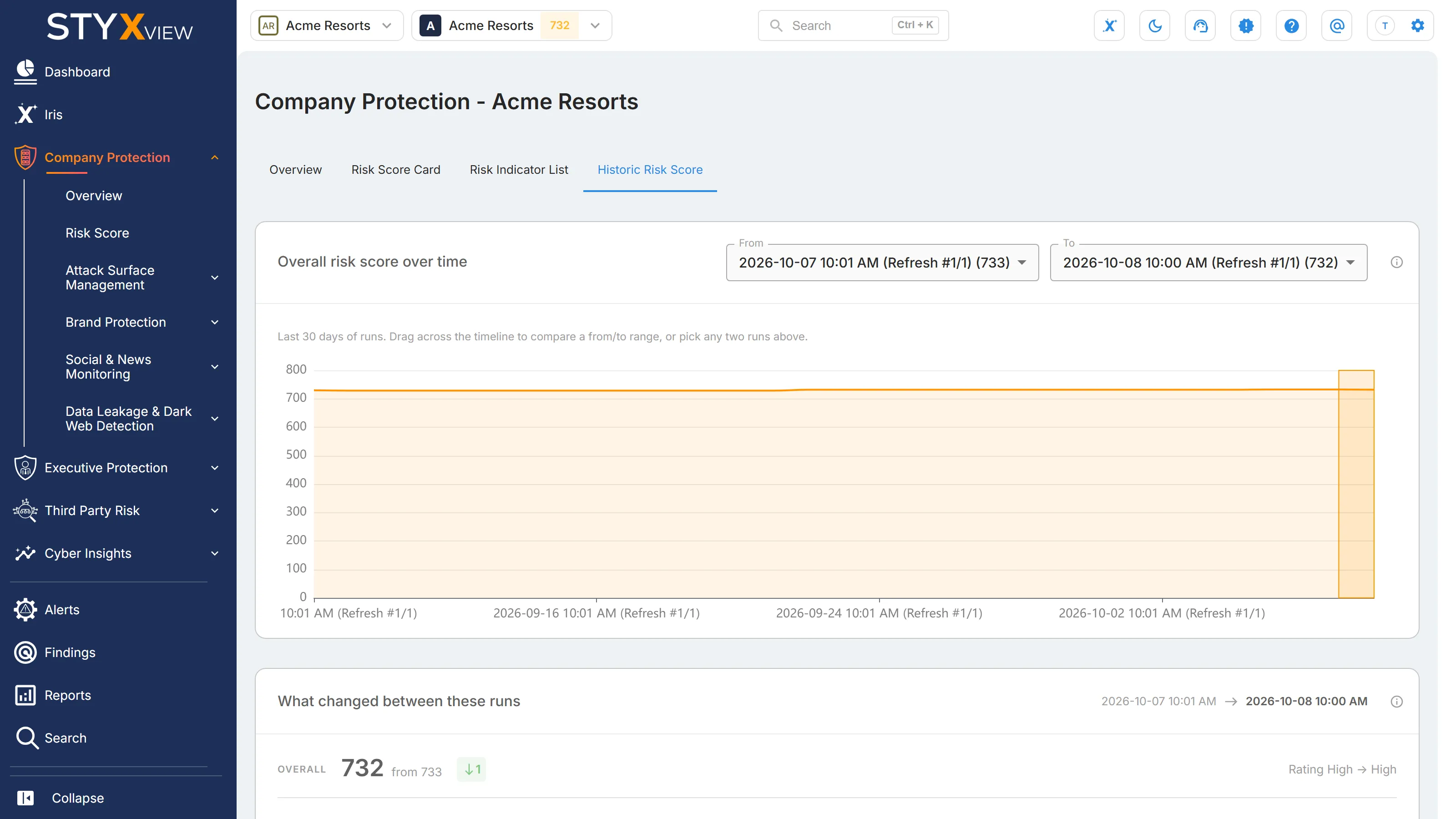
Section titled “Historic Risk Score”Use the "Historic Risk Score" tab to see how the score moved between scoring runs and which indicators moved it. The tab needs at least two runs.
-
Look at the "Overall risk score over time" chart, which shows the runs of the last 30 days.
-
Choose the two runs to compare: select them under "From" and "To", or drag across the chart. "From" must be earlier than "To".
-
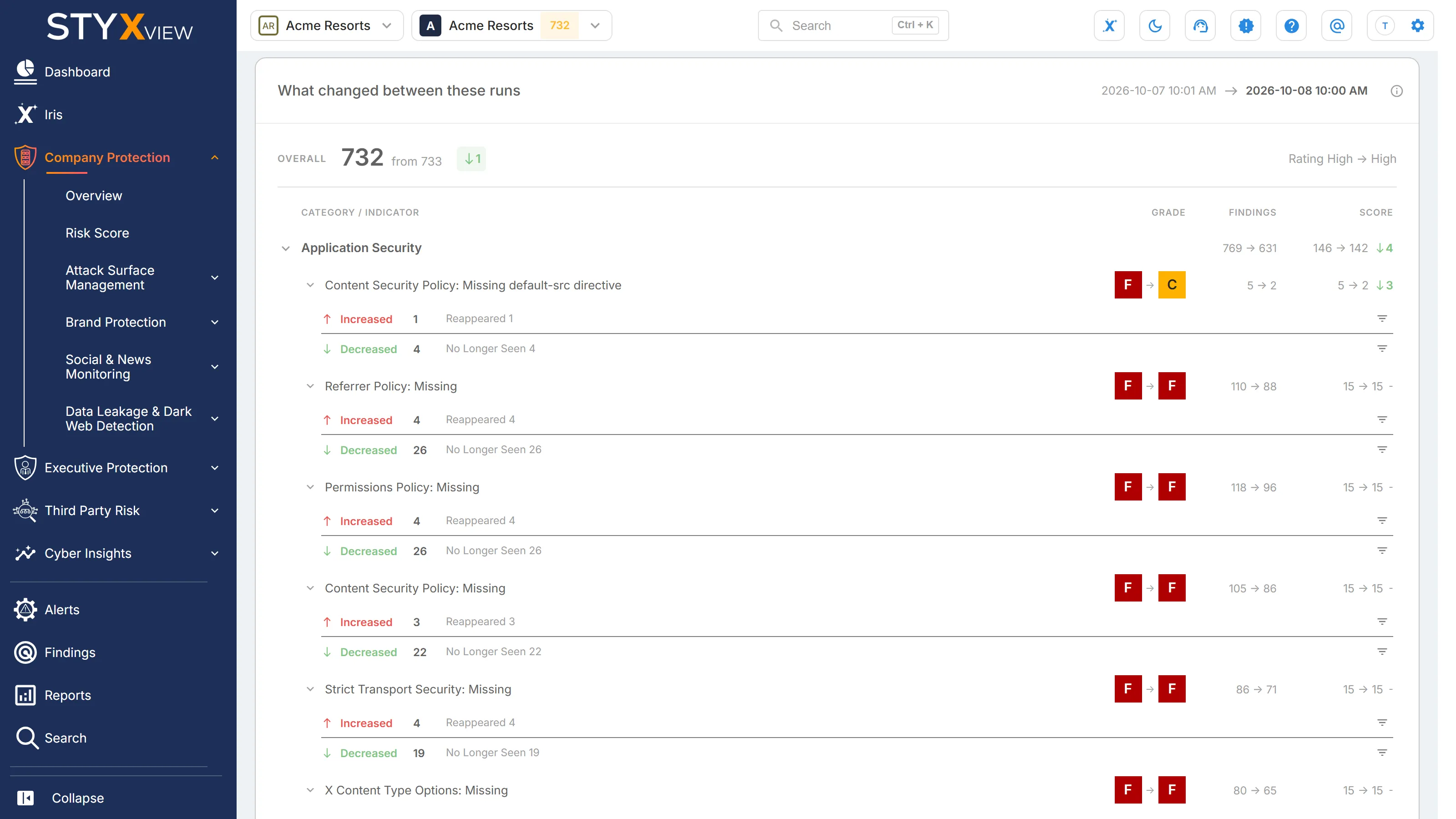
Read "What changed between these runs". It shows the overall score of both runs, then each category and indicator whose grade, findings, or score changed.
-
Select an indicator to expand it. "Increased" counts the findings that entered it between the two runs, and "Decreased" the findings that left it, by status. Select a status, or the filter icon beside it, to open those findings on the Findings page in a new tab.
A score can change because findings were remediated, because new findings were detected, or because new intelligence arrived about assets that were already monitored. The indicator breakdown shows which.